
You are using an out of date browser. It may not display this or other websites correctly.
You should upgrade or use an alternative browser.
You should upgrade or use an alternative browser.
Project Cars
- Thread starter AlienTaker
- Start date

AlienTaker
Whale Masseur
No it doesn't! I imagine you're talking about the road version of the RUF RGT8? BUT! after some tuning it does become beautiful
Much like the Evo, it has jelly suspension, but I spent around 2 hours tuning it and got it riding shweet!
Then throw me some tuning setups pls and i just need to get the right ratio on my wheel toe but you play with a controller right Beo?
also what time is this race maybe i'll join and what are we racing?

StoneCold
New member
We having a race night tomorrow, 26.05.2015?
I suppose we can have a race tomorrow evening

How does 22:00 - 23:00 sound ?
Will spread the word via announcement on the Steam group once more and to a few other people. The Dserver also updated last night. With that said, I also came across this: https://pcarstelemetry.wordpress.com/
Looks pretty rad

AlienTaker
Whale Masseur
So who of you here are good with car setups and who can help me out with the RUF but the stock standard one

BeoTeK
New member
I'm playing with a wheel. Will give some pointers bit later dude when in front of a pc.So who of you here are good with car setups and who can help me out with the RUF but the stock standard one

GregRedd
New member
Will definitely try to join in tonight, Eskum willing - scheduled for 4 hours of load shedding between 6:00pm - 10:30pm on all 3 stages today, so may be a late starterI suppose we can have a race tomorrow evening
How does 22:00 - 23:00 sound ?
Will spread the word via announcement on the Steam group once more and to a few other people. The Dserver also updated last night. With that said, I also came across this: https://pcarstelemetry.wordpress.com/
Looks pretty rad

Incidentally, is there a way to set Steam up to get group notifications offline - via email, or push notifications via the app, or some such? Never saw the message about the weekend session at all.
BeoTeK
New member
[MENTION=7799]AlienTaker[/MENTION]
Ok, here goes some quick pointers. Hope this helps as I'm battling to find some in-game screens of those screens to get their exact wordings.
I think first and foremost is not get too overwhelmed by all the settings, concentrate on the biggest impacting settings where it really makes a difference. I have shaved 20 seconds off of lap times just by tuning the suspension setup.
Though I don't tune from this screen, I use the individual screen. I imagine it might be easier from here though as you can do left and right equally.

From top to bottom:
I hope this all helps, again this is how I understand things. I know a little about a little about cars. I don't claim to be proficient in the real world mechanics but I have been tuning virtual cars since GT5 and Forza 4 and these systems have worked for me.
I found this thread that should help explain things better than I have:
https://www.gtplanet.net/forum/thre...ide-steering-castor-guide-3d-now-live.327780/
Ok, here goes some quick pointers. Hope this helps as I'm battling to find some in-game screens of those screens to get their exact wordings.
I think first and foremost is not get too overwhelmed by all the settings, concentrate on the biggest impacting settings where it really makes a difference. I have shaved 20 seconds off of lap times just by tuning the suspension setup.
Though I don't tune from this screen, I use the individual screen. I imagine it might be easier from here though as you can do left and right equally.
From top to bottom:
- Tire pressure: I normally leave this as is, might change slightly upon course conditions or understeer/oversteer.
- Caster angle: not too sure what this is

- Camber angle: This is how much of a vertical angle the wheels are in relation to the body, like a stanced look. I like to ride with a camber around -1.5 to -2.0 - this will affect handling directly and will allow turn in a lot more but will sacrifice straight line speed/stability. Excessive negative camber will cause you to drift more easily (if you wanna play around)

- Ride Height: This can impact handling and cornering, though I've noticed this setting cannot be changed on a lot of cars
- Spring Rate: This is the rate at which the spring will move. I higher setting will make the springs stiffer and thus harder. You will often find stock cars will have this fairly soft for a more comfortable ride. STIFFEN THIS UP! - generally I keep the front and rear close together or I make the front slightly softer to allow oversteer.
- Bump Stop: This will be the ceiling of the springs or determine where the shocks bottom out. Have this too high and you won't get much if any travel on the springs.
- Slow Bump: This determines how weight is transferred from front to rear. You will notice this under acceleration and deceleration.
Rebound: The rate at which it returns to it's original position
- Fast Bump: This determins how quickly the stocks are able to take in quick bumps; like the curbs and chicanes where the weight transfers quickly from left to right or vice versa
Rebound: The rate at which it returns to it's original position
- Sway Bar: This is how much lateral movement the car will undergo while cornering. Stiffen this up a tad but be careful, too much and you will cause understeer and will feel like your wheels are locking and cause you to loose traction when cornering. Gernerally I make the front a little tighter than the back to allow the back to roll more in the corner.
- Toe-in Angle: This is how much of a lateral angle, it will cause the wheels to point inward or outward. I like to set the front to a -0.2 and rear around 0 or 0.1 degree. This will count towrards turning into corners while maintaining grip and willl directly impact over/under steer.
I hope this all helps, again this is how I understand things. I know a little about a little about cars. I don't claim to be proficient in the real world mechanics but I have been tuning virtual cars since GT5 and Forza 4 and these systems have worked for me.
I found this thread that should help explain things better than I have:
https://www.gtplanet.net/forum/thre...ide-steering-castor-guide-3d-now-live.327780/
Last edited:
GregRedd
New member
Veni, ego solus bembum, reliqui!I suppose we can have a race tomorrow evening
How does 22:00 - 23:00 sound ?
(I came, I raced alone, I left!)
Who knew that the Latin for "raced" was "bembum"?
We clearly need to coordinate these things a little better. I'll have to beat you all next time!
StoneCold
New member
Veni, ego solus bembum, reliqui!
(I came, I raced alone, I left!)
Who knew that the Latin for "raced" was "bembum"?
Sorry man, had to work late last night, just didn't have the energy to do some racing
But I agree, we need to organize it a bit better, seeing that it was just me, you and Beotek that was originally interested in doing it.
GregRedd
New member
Damn life! Always getting in the way of good gaming time!Sorry man, had to work late last night, just didn't have the energy to do some racing
No worries mate, maybe something on the weekend?
GregRedd
New member
Just spent an unproductive hour over lunch playing with Custom Liveries. I want to do a Formula A one for my F1 stats site as a bit of a laugh, and wanted to see how it works.
Didn't have much time to do anything except a lot of experimenting to see which bit appears where on the car, so consider this a definite Proof of Concept, Work In Progress at this stage. The black areas are all still available for painting, and I forgot to turn the wire-frame off before saving, so those thin lines shouldn't be on there either. It looks like you're able to customise pretty much every visible area on the car.
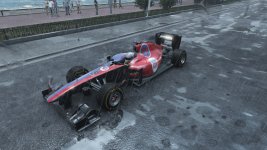
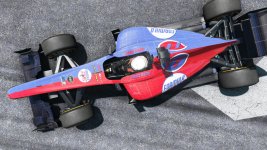
Didn't have much time to do anything except a lot of experimenting to see which bit appears where on the car, so consider this a definite Proof of Concept, Work In Progress at this stage. The black areas are all still available for painting, and I forgot to turn the wire-frame off before saving, so those thin lines shouldn't be on there either. It looks like you're able to customise pretty much every visible area on the car.
AlienTaker
Whale Masseur
Where and how do you create these? and wit what?
BeoTeK
New member
Where and how do you create these? and wit what?
Did any of that help?
I managed to tweak the RUF RGT8 quite nicely if you want the exact settings. Pity you can't save your tunes per car/track.

PythonFSi
New member
Where and how do you create these? and wit what?
I'd also like to know. I've tried doing it from the garage in car setting but I don't see an option to do it.
I've downloaded the liveries pack but still nothing. On PS4 btw.
GregRedd
New member
(I'm also going to assume [MENTION=7799]AlienTaker[/MENTION] was asking about the livery creation?)I'd also like to know. I've tried doing it from the garage in car setting but I don't see an option to do it.
I've downloaded the liveries pack but still nothing. On PS4 btw.
Sadly, from what I've managed to find out, custom liveries can only be implemented on PC versions at the moment.
They are done out of the game by editing a template image map file in an external image programme (Photoshop, GIMP, etc.) and then saving (after installing a free plugin to enable the use of DDS files) the result over the existing template file.
(I assume part of the reason it only works on PC is because we are able to access the file tree for the game and can manipulate the files directly.)
The template system is pretty comprehensive, although I haven't gone anywhere near anything more than the Formula A base template.
In addition to the main map that I've been playing with, there are also separate template maps for specular highlights (controls the glossyiess of the paint material) and one for fresnel levels (they control the amount and colour of reflections), as well as separate templates for chassis and roll cage paint, and another one for wheel rims. And these are repeated for every car type in the game - there's something like 550 template files in the custom livery folder.
Using all of them allows some very creative and clever people (not yours truly by any stretch of the imagination!) to create this sort of high quality work:
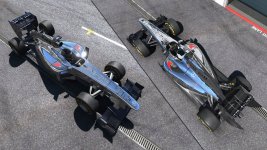
The application of all this effort is still very limited in practical terms though.
Because the custom template files are stored locally, only you get to see them in action on your PC. (I'm honestly not sure what online players will see when I race with a custom livery applied - a plain white car or a random livery possibly?)
That means that at the moment you could make a custom livery for your PC-using team/clan/club/forum group, personalise it for each member with a name and number, and send the files to them individually to install on their machines. But even if you were then all in the same online race you wouldn't be able to "see" your team mates' matching liveries.
Also, because of the file naming system, you can only have one custom livery per car installed and active at a time. Each time you want to change to a different custom livery, you have to resave the appropriate template files over the ones you are using.
If you want to know more, there's a fantastic tutorial that I found after my messing about yesterday here: http://forum.projectcarsgame.com/showthread.php?21857-Vehicle-custom-liveries-How-to-FAQ
Last edited:

XbatousaiX
New member
I dont think the ai is affected by riding of the track it has been a issue in driving games ai for a long time and are they affected by tyre wear?I am really enjoying the game I really enjoy the progression in the career.
GregRedd
New member
Been meaning to ask opinions on this for a bit already, just keep forgetting. Yeah, I'm old.
Are the obvious white lines I see when viewing cars at certain angles normal for pCars? On the joins between body panels and at the edges of the car. Is this what the hip and young among you call "jaggies"? Anything I can do to reduce them?
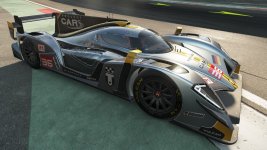
I only notice them at certain angles, and in certain cars, but that could be just because I haven't really investigated it too much. Or that my eyes are truly failing me.
Are the obvious white lines I see when viewing cars at certain angles normal for pCars? On the joins between body panels and at the edges of the car. Is this what the hip and young among you call "jaggies"? Anything I can do to reduce them?
I only notice them at certain angles, and in certain cars, but that could be just because I haven't really investigated it too much. Or that my eyes are truly failing me.
GregRedd
New member
That's what I though it was. Only problem is, just like you, I don't have a clue which are the better settings, or combination of settings. In the pCars visual options there's:Yeah, that seems like you need to add some AA on there, though the differences between MSAA FXAA which is better or worse, I'm not sure.
Anti-Aliasing (options are Off / MSAA / High / DS2X / DS2M / DS4X /DS6X / DS9X)
and then also these two:
FXAA (Off / Low / Medium / High)
SMAA (Off / Low / Medium / High / Ultra)
You can select something in FXAA only if SMAA is Off. If you select a SMAA option it automatically switches FXAA off.
Guess I could not be so damn lazy and play around with the settings later. Just thought someone might have the insight needed to avoid wasting good play time
BeoTeK
New member
That's what I though it was. Only problem is, just like you, I don't have a clue which are the better settings, or combination of settings. In the pCars visual options there's:
Anti-Aliasing (options are Off / MSAA / High / DS2X / DS2M / DS4X /DS6X / DS9X)
and then also these two:
FXAA (Off / Low / Medium / High)
SMAA (Off / Low / Medium / High / Ultra)
You can select something in FXAA only if SMAA is Off. If you select a SMAA option it automatically switches FXAA off.
Guess I could not be so damn lazy and play around with the settings later. Just thought someone might have the insight needed to avoid wasting good play time
MSAA = Multi Sampling Anti Aliasing
DS = Direct Sampling me thinks
I know FXAA is more taxing on your machine than MSAA, and I know you can't have both, it's one or the other. I normally just go with what's auto selected.