Thread of PC Woes, Troubles, Problems, and Issues

Hey powder if you can maybe at the colage or something get Kasperskey rescue disk.
http://www.softpedia.com/get/Antivirus/Kaspersky-Rescue-Disk.shtml)

Burn it to cd and boot from it it will then scan your hhd. What you also can try is go into safe mode and run Malwarebytes and see if it will pick up the trojan. You can also try avast with a bootup scan/or if your defender got one run that.

Just to make sure everytime you refresh you can see that your hhd space is taken over then you pc becomes so slow you got to reset and then you got back all your space then it all gets eaten up again?
 
Last edited:
I've just about had it with my laptop. There's a virus that is literally eating away at my harddrive space and since my Windows Update refuses to updat, my defender is very out of date.

I need a fast and free solution if anyone can think of something... I've used AVG before but it buggered up my computer and put my drivers in quarantine.... <_<

I recently somehow had been a victim of a trojan horse thingy, similar to your post. Follow CrzWaco's suggestion, its what I used and helped quite a bit.
 
Okay ... I have something a little random going on - it's happened before and I sorted it, but I forgot what I did, so hopefully someone here can figure it out.

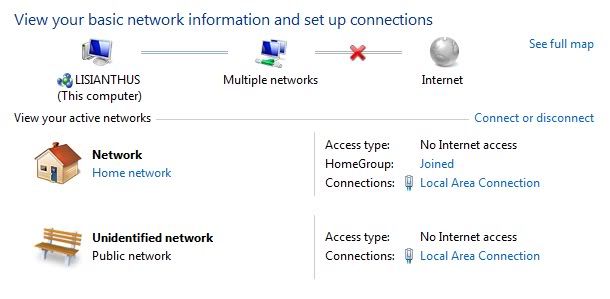
Whenever I reboot, Windows somehow picks up 2 networks - the home network and the public network. This also blocks my internet connection somehow. The only way to fix it is to disable my network adapter and enable it again, at which point the public network disappears and everything is peachy.

Until the next time I reboot. Screenshot of what I see below:

random.jpg
 
Go to Control panel ... then administrative options.
Then "services".
Scroll down and find a service named "Bonjour service". double click on this service, then disable it. Now choose "automatic (delated start)".
Click OK then close everything and reboot, when you do, your network and internet connection should be fine.
Takes a lot to explain the problem but it is a service created by Apple that is commonly used in several applications to get your network card to configure itself
automatically to work with certain services. It does not play well with windows services as a rule, and delaying the auto start gives the windows services time to start prior to its activation at reboot.
Hope this helps!

Try this.
 
Sorted - thanks Waco.

Took me a while to find the damn thing though - it wasn't named Bonjour on my service list but had some extended ID tag. But I've switched it ... and everything is peachy now :)

Much appreciated.
 
Hey guys

I don't usually like to ask for help unless I've tried almost everything.

My PC has started acting up over the past 2 weeks and I know that it's not my GFX Card ATI 5670 because its only about 5 months old. and now what happens is that when I play games for a long period of time, my PC goes black and I just hear the jerking of the game. The PC doesn't reboot itself and it just hangs.

Please help, this is starting to worry me :(

Thanks
 
Hey guys

I don't usually like to ask for help unless I've tried almost everything.

My PC has started acting up over the past 2 weeks and I know that it's not my GFX Card ATI 5670 because its only about 5 months old. and now what happens is that when I play games for a long period of time, my PC goes black and I just hear the jerking of the game. The PC doesn't reboot itself and it just hangs.

Please help, this is starting to worry me :(

Thanks

I hate to be the bearer of bad news but that sounds exactly like a graphics card failing. Have you checked temps? Does it only happen in specific games and do you have a spare card around somewhere that you could test?
 
Syco sounds like your cpu is overheating can also be your gpu but slim change since it's new.

dam just wanted to add that but isengard beat me too it.
 
Last edited:
I hate to be the bearer of bad news but that sounds exactly like a graphics card failing. Have you checked temps? Does it only happen in specific games and do you have a spare card around somewhere that you could test?

Honestly I'm hoping its not :( I bought it from Zaps and I dont have the slip or atleast I dunno where it is... Whats the warraty on those cards??

Syco sounds like your cpu is overheating can also be your gpu but slim change since it's new.

dam just wanted to add that but isengard beat me too it.

I thought so too but I ran a stress test on my CPU and my RAM as well and those are normal CPU is running at around 45 degrees.
 
Last evening when I turned on my computer, it went through the first second or four of booting, but before anything appeared on my screen, the machine switched itself off and then booted itself up again. This was repeated a number of times until I turned off the power at the wall. All of my fans where spinning during boot up.

I tried again roughly 15 minutes ago and eventually got into a BIOS screen which claimed that the machine had recovered from an unsuccessful overclock and asked if I would like to revert to failsafe settings. This I promptly did. This is not the first time this has happened either.

Do any of you know what might have caused this [I do not overclock my machine] and how it might be avoided in future?

Thanks
 
Last evening when I turned on my computer, it went through the first second or four of booting, but before anything appeared on my screen, the machine switched itself off and then booted itself up again. This was repeated a number of times until I turned off the power at the wall. All of my fans where spinning during boot up.

I tried again roughly 15 minutes ago and eventually got into a BIOS screen which claimed that the machine had recovered from an unsuccessful overclock and asked if I would like to revert to failsafe settings. This I promptly did. This is not the first time this has happened either.

Do any of you know what might have caused this [I do not overclock my machine] and how it might be avoided in future?

Thanks

What you can do is update your bios and see if that does anything for you :)
 
Hi guys.

So I recently completed building my PC (ooh, shiny...) and after having some issues with the graphics which turned out to a screen problem...

Anyway, I tried to boot it up, and it POSTs, the BIOS is the latest version, and then it checks for devices - and finds no bootable partition. I have tried 2 boot up CDs (XP, Ubuntu) and a flash disk (Ubuntu) - all of which can boot up my laptop. Now, I looked in the BIOS and it "sees" the devices (through the SATA and USB for the flash). All of the cables are connected, so I don't know what it's problem is. However, it searches for them, then displays a "No any device exists!". Also, it says the Asus express gate installation is incomplete.

My specs:

Asus p7p55 lx motherboard
i5 760
GTX 460 FTW
4GB transcend JetRam (It works, the little MemOK! light is off when I power it on)
Samsung BX2450 monitor connected via HDMI
Super Multi Write LG DVD drive
2TB Seagate SATA 2.

The HDD has no OS on it.

What could the problem be?
Thanks.
 
Ok, quick update - I have managed to get it to boot from the flash disk by disconnecting the HDD and the DVD drive so that it can only look in one place. However the screen resolution is a bit weird. I looked on the ubuntu forums (currently running that from flash and posting from new PC ^^) and it says I need to get the drivers - which I have. However, I do need to install this to my HDD - but I don't know if it will recognize my flash after I plug the devices back in... Will keep you updated.
 
Hey Guys

A while ago I was having Random PC crashes during games and all that even after a format. Eventually my PC died for good and ja it wasn't my GPU at all and it wasn't my Mobo and cred definitely goes to Sharkbait for the assistance as always, it turned out to be my Ram and not just one module but both modules, for some or other reason there was a extremely minor power surge at my house and ja, it's one of those that is hardly noticable and it effected only the ram modules.

So there you have it just thought I would update you guys :)

Thanks for all the help :)
 
Oh jeez ... that is a bugger to spot - especially since you would test your PC by removing your modules one by one.
 
Oh jeez ... that is a bugger to spot - especially since you would test your PC by removing your modules one by one.
Well Sharkie and I, we removed both of them first because obviously I was getting a no post from my machine and then we used his wife's memory and sure enough the pc booted up without a problem, so I guess I saved myself R1500 :p
 
Back
Top