
You are using an out of date browser. It may not display this or other websites correctly.
You should upgrade or use an alternative browser.
You should upgrade or use an alternative browser.
Thread of PC Woes, Troubles, Problems, and Issues
- Thread starter Isengard
- Start date


Wyvern
Khaleesi
Cheers guys. SSD it is. Takealot has a daily deal going on the crucial MX200 so I might grab that.
You will not regret that. Its my fav addition to my pc, it really does make a huge difference. I just copy certain games to it to help boost their performance


Apollo
New member
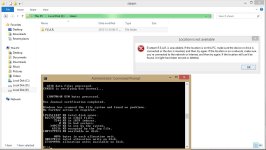
So i upgraded my system with an SSD last night which is running great but i have run into a weird issue. I changed the sata controller form IDE to AHCI before installing windows on this new drive but now i'm getting errors like the following when trying to access some of the files on the old drives.

BeoTeK
New member
I have an issue that I'm hoping someone might be able to shed some light on to, though I think I know the answer.
I have been given a backup of an Exchange Database (an .edb file) which is around 90GB.
The purpose is that a user wants a restore done on their mailbox. Now I can't see a way to do this without having to mount the database?
Problem is our Exchange Server was decommissioned and license is no longer valid, so frankly I consider this user to be "screwed".
I have been given a backup of an Exchange Database (an .edb file) which is around 90GB.
The purpose is that a user wants a restore done on their mailbox. Now I can't see a way to do this without having to mount the database?
Problem is our Exchange Server was decommissioned and license is no longer valid, so frankly I consider this user to be "screwed".

PsychoFish
New member
I have an issue that I'm hoping someone might be able to shed some light on to, though I think I know the answer.
I have been given a backup of an Exchange Database (an .edb file) which is around 90GB.
The purpose is that a user wants a restore done on their mailbox. Now I can't see a way to do this without having to mount the database?
Problem is our Exchange Server was decommissioned and license is no longer valid, so frankly I consider this user to be "screwed".
Yup, pretty much screwed. You'll need to either import or mount the database
PsychoFish
New member
[MENTION=6600]PsychoFish[/MENTION]
I guess it would be a good idea to rather have SVN and repo on a linux distro?
Depends on the use case and what you're trying to achieve.
BeoTeK
New member
Depends on the use case and what you're trying to achieve.
multiple ways to use SVN? :wtf:
As far as I know it's just a repo. I just saw the machine has been running for days... weeks... months, and a windows machine. People are starting to bitch, "The machine has performance issues".
PsychoFish
New member
We're talking Apache Subversion here right?
We use it for our source code repositories; I also use it for our BIND configurations and for various other configuration files I need version controlled.
For YUM repo control I use SpaceWalk (in conjuction with Puppet and Foreman)
We use it for our source code repositories; I also use it for our BIND configurations and for various other configuration files I need version controlled.
For YUM repo control I use SpaceWalk (in conjuction with Puppet and Foreman)

Cronus086
New member
So a while ago i bought myself one of these due to the right side speaker of my corsair 1500 started acting up. So when i got the new pair, i plugged them in and installed drivers, etc. i immediately noticed a very faint buzzing / static noise in the background when no audio was present.
Obviously when sound is playing through the headset i can't hear the buzzing / static noise at all. I've kinda ignored it for a long time now but lately its started to irritate me a lot more and i really want to fix the problem. I've tried replacing the headset with another pair from the supplier, I've tried switching the headset to different USB ports, I've tried only connecting one of the two USB connectors to my pc, I've reinstalled drivers / software, I've in the past year bought a new power supply (FYI, static noise was present with previous PSU as well), I've even formatted and still the buzzing / static noise is there.
Sometimes the static noise seems to increase a tiny bit when i use my mouse (Logitect G400s), e.g. scrolling on a webpage, etc. I've tried unplugging the mouse and keyboard but the noise is still there. I've tried a few additional things like connecting the headset to a powered USB hub but no success. I'm starting to think it's my motherboard that has some kind of shitty isolation between the audio chip and something else? Anyone that can think of some ideas as to what might cause the issue? or am i going to have to revert to buying a new motherboard
Obviously when sound is playing through the headset i can't hear the buzzing / static noise at all. I've kinda ignored it for a long time now but lately its started to irritate me a lot more and i really want to fix the problem. I've tried replacing the headset with another pair from the supplier, I've tried switching the headset to different USB ports, I've tried only connecting one of the two USB connectors to my pc, I've reinstalled drivers / software, I've in the past year bought a new power supply (FYI, static noise was present with previous PSU as well), I've even formatted and still the buzzing / static noise is there.
Sometimes the static noise seems to increase a tiny bit when i use my mouse (Logitect G400s), e.g. scrolling on a webpage, etc. I've tried unplugging the mouse and keyboard but the noise is still there. I've tried a few additional things like connecting the headset to a powered USB hub but no success. I'm starting to think it's my motherboard that has some kind of shitty isolation between the audio chip and something else? Anyone that can think of some ideas as to what might cause the issue? or am i going to have to revert to buying a new motherboard

Blazzok
New member
So a while ago i bought myself one of these due to the right side speaker of my corsair 1500 started acting up. So when i got the new pair, i plugged them in and installed drivers, etc. i immediately noticed a very faint buzzing / static noise in the background when no audio was present.
Obviously when sound is playing through the headset i can't hear the buzzing / static noise at all. I've kinda ignored it for a long time now but lately its started to irritate me a lot more and i really want to fix the problem. I've tried replacing the headset with another pair from the supplier, I've tried switching the headset to different USB ports, I've tried only connecting one of the two USB connectors to my pc, I've reinstalled drivers / software, I've in the past year bought a new power supply (FYI, static noise was present with previous PSU as well), I've even formatted and still the buzzing / static noise is there.
Sometimes the static noise seems to increase a tiny bit when i use my mouse (Logitect G400s), e.g. scrolling on a webpage, etc. I've tried unplugging the mouse and keyboard but the noise is still there. I've tried a few additional things like connecting the headset to a powered USB hub but no success. I'm starting to think it's my motherboard that has some kind of shitty isolation between the audio chip and something else? Anyone that can think of some ideas as to what might cause the issue? or am i going to have to revert to buying a new motherboard
I have the same headset and I don't have this problem. If I did I can't remember having it.
Have you tried it in a different PC or laptop to see if it goes away? This will atleast pinpoint the problem to your PC (or not, whatever the case may be). Maybe it is a grounding issue in your case? This is a really strange thing I must say.
Cronus086
New member
I have the same headset and I don't have this problem. If I did I can't remember having it.
Have you tried it in a different PC or laptop to see if it goes away? This will atleast pinpoint the problem to your PC (or not, whatever the case may be). Maybe it is a grounding issue in your case? This is a really strange thing I must say.
My next step was to bring the headset to the office and see if i can still hear the noise on my work PC but i forgot it at home

PsychoFish
New member
I have the same headset and I don't have this problem. If I did I can't remember having it.
Have you tried it in a different PC or laptop to see if it goes away? This will atleast pinpoint the problem to your PC (or not, whatever the case may be). Maybe it is a grounding issue in your case? This is a really strange thing I must say.
It's most likely a grounding issue. This could be caused by a loose connector somewhere. Check all your cables running from your PSU and ensure that there are no loose cables in the pin contacts of the molex connectors. DC circuits (if I recall correctly) are very susceptible to feedback if not grounded properly.

DarkStarZA
New member
Does sounds like a grounding issue. Try a different power cord to the PSU. Are you using a multiplug? Plug your PC directly into the wall socket. It could even be the wall socket that's not grounded properly. Test by running a power lead from another room.
A fun way to test if your case is grounded correctly is to touch something bare metal in your house that is grounded, like a metal door frame or window frame and then touch your PC case with the other hand. If you feel a tingle from your case it is not grounded correctly. Standing barefoot on a tile floor might also work. My PC use to "tickle" me if I was barefoot
Warning: The tingle might vary in severity based on how badly grounded it is.
A fun way to test if your case is grounded correctly is to touch something bare metal in your house that is grounded, like a metal door frame or window frame and then touch your PC case with the other hand. If you feel a tingle from your case it is not grounded correctly. Standing barefoot on a tile floor might also work. My PC use to "tickle" me if I was barefoot
Warning: The tingle might vary in severity based on how badly grounded it is.
Cronus086
New member
Does sounds like a grounding issue. Try a different power cord to the PSU. Are you using a multiplug? Plug your PC directly into the wall socket. It could even be the wall socket that's not grounded properly. Test by running a power lead from another room.
A fun way to test if your case is grounded correctly is to touch something bare metal in your house that is grounded, like a metal door frame or window frame and then touch your PC case with the other hand. If you feel a tingle from your case it is not grounded correctly. Standing barefoot on a tile floor might also work. My PC use to "tickle" me if I was barefoot
Warning: The tingle might vary in severity based on how badly grounded it is.
Lol, i don't think i'll like the "tickle" method
But ja, i'll have a look tonight. Thanks guysGreat... now my manager decides it would be a good idea to change all the IP's and the domain controller and subnet on a business night. Dunno why can't wait for a weekend. But then again, he won't be impacted by the effects it could possibly have the following day.
Wowzers! why on earth would he want to do that anyways, is ur network expanding and u need more ips? Tell him to upgrade to 2012 and install IPAM, that way he can manage his IP addresses better
BeoTeK
New member
Wowzers! why on earth would he want to do that anyways, is ur network expanding and u need more ips? Tell him to upgrade to 2012 and install IPAM, that way he can manage his IP addresses better
expanding network and to stay in uniform of each other between Margate, Cape Town, Pretoria and a VPN into Germany.