
You are using an out of date browser. It may not display this or other websites correctly.
You should upgrade or use an alternative browser.
You should upgrade or use an alternative browser.
Windows 10 discussion thread
- Thread starter MetalSoup
- Start date


ViperGTI
New member
This has got to be the worst Windows installation experience I've ever had. 
I installed the x86 version on a VM first to test and everything worked fine. Then I downloaded the x64 ISO and tried installing a new instance without any luck. Basically, after my first restart after the installation process start, the screen just goes black (monitor on, blank screen, no cursor or pointer).
I'm just glad I kept my primary OS on my SSD out of it and made an image backup of my Win 7 gaming partition.
Now downloading the US version to see if that will sort out the issue otherwise I'm done with this crap. Wasted 5 hours already trying different things to get it working and without luck.
I installed the x86 version on a VM first to test and everything worked fine. Then I downloaded the x64 ISO and tried installing a new instance without any luck. Basically, after my first restart after the installation process start, the screen just goes black (monitor on, blank screen, no cursor or pointer).
I'm just glad I kept my primary OS on my SSD out of it and made an image backup of my Win 7 gaming partition.
Now downloading the US version to see if that will sort out the issue otherwise I'm done with this crap. Wasted 5 hours already trying different things to get it working and without luck.

Ichigo
New member
I have done all the available updates.
How would I go about starting it? I'm pretty sure it is already downloaded.
Found another solution to the problem and worked on my old laptop
Locate the registry key: [HKEY_LOCAL_MACHINE\SOFTWARE\Microsoft\Windows\CurrentVersion\WindowsUpdate\OSUpgrade]
It should exist, but if not, create it.
Create a new DWORD (32-bit) Value with Name = "AllowOSUpgrade†(without the quotes), and set the Value = 0x00000001.

AlphaJohn
New member
I have done all the available updates.
How would I go about starting it? I'm pretty sure it is already downloaded.
No Need to do any updates if you want to go to 10
Simply download the install media for your PC from here
Create the install media be it USB/ISO. Boot into your Old Windows that has been activated and run the setup.....
From here you will have an option to upgrade or wipe everything (Clean install)
Yes its that simple.
I opted for this format as I have 4 PC's and did not feel like downloading 10 on every PC/Tablet.
So far I upgraded My Gaming desktop, Fresh install on my laptop, and tablet.... Up next is an upgrade on my media center. No issues to report yet. In fact my laptop sound bug is now gone that 8.1 had. Sound disapeard every now and then and could only be fixed with a reboot.
Last edited:

FarligOpptreden
New member
I concur that the ISO route is by far the easiest. I upgraded both my laptop and gaming PC with the same set of files and both worked. Funny enough, I had to redownload GPU drivers for both machines after the upgrade - 840m in the laptop and R9-280x in the desktop.

blaaislaai
New member
Apart from all the installation issues, the people who have win10 up and running, how do you like it so far? Anything you don't like?

MetalSoup
There's a GIF for that
Apart from all the installation issues, the people who have win10 up and running, how do you like it so far? Anything you don't like?
The only thing I really don't like is the fact that you can't customize the colors much, but Windows has been that way for a long time now. Everything else seems pretty neat. I actually really like some of the built in apps.

GregRedd
New member
Will give more feedback later this weekend when I've had a chance to play around a little more, but from what I've seen and used so far, I'm liking it. As Euge... ahh [MENTION=17]MetalSoup[/MENTION] said, some of the built in apps are really good, the new browser (Edge) is slick, and all the programmes, games and apps that I've tried so far have worked exactly as before the upgrade.Apart from all the installation issues, the people who have win10 up and running, how do you like it so far? Anything you don't like?
Out of idle curiosity, could those who had/are still having upgrade issues confirm what version they were going from, and which version they went to? And whether they're doing upgrade install or fresh installs. I upgraded from 8.1 Home to 10 Home on two separate machines without even a hint of a problem, so I'm wondering if maybe there's something we can identify that is causing the problems for others. Could the Home vs Pro versions or Upgrade vs Clean Install be part of it maybe?
FarligOpptreden
New member
I absolutely LOVE the new task view / virtual desktop functionality. After using it at work for 1 day I can't imagine doing without it anymore. The new calculator is also very slick with all the conversion options built in. Other than than, pretty similar to 8.1, imho... I've nevet been a big Start Menu user and always pin my most frequently used apps to the taskbar. The rest I search for...

VirtualForce
New member
the only thing i dont like is the fact that updates are automatic , you no longer have much control in that department and
the ability to select certain windows updates. unless if im missing something.
One of the first things I had a look at, meant to post about it earlier. I am on 10 Pro and can disable my updates.


Mash
New member
thanks now i can enjoy with no stressOne of the first things I had a look at, meant to post about it earlier. I am on 10 Pro and can disable my updates.

Blazzok
New member
Upgraded to Win10 by using the media tool and putting the install on a flash stick.
However I am already regretting upgrading. My audio is so freaking soft, I have to max Windows Volume as well as my headphone volume on the control pod for it to be at "normal" levels. I have tried reinstalling audio drivers, etc., checked that all the audio settings are correct all over.
I also now have old files/folders on my C drive that it will not allow me to delete because I need admin rights (I am the admin). I tried adding additional rights to the folders, removing read only from them, nothing works. Everything requires admin rights.
To top it off, when I decided screw it, I will recover and go back to Win8.1, it didn't want to work. So if I do want to go back to Win 8.1, I will have to reinstall it.
Great stuff.
However I am already regretting upgrading. My audio is so freaking soft, I have to max Windows Volume as well as my headphone volume on the control pod for it to be at "normal" levels. I have tried reinstalling audio drivers, etc., checked that all the audio settings are correct all over.
I also now have old files/folders on my C drive that it will not allow me to delete because I need admin rights (I am the admin). I tried adding additional rights to the folders, removing read only from them, nothing works. Everything requires admin rights.
To top it off, when I decided screw it, I will recover and go back to Win8.1, it didn't want to work. So if I do want to go back to Win 8.1, I will have to reinstall it.
Great stuff.
AlphaJohn
New member
Must admit they did a hell of a better job for tablets than 8 or 8.1 did.
Esp the ability to switch between them is what better than that forced start screen crap.
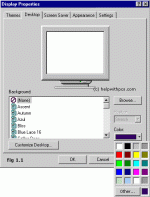
Only problem I have found so far is as Eug erm Metalsoup stated the lack of color control. My problem is not so much looks related as its about usability. See we use Coreldraw 5 at work and the menu's display in white text over white backgrounds, and the only way to fix this problem (Google'ed) is to change the desktop background color. Something you can not do in 10. (the old color options are no more to be found see fig 1.1) The new one in 10 doesn't work for this workaround.
Esp the ability to switch between them is what better than that forced start screen crap.
Only problem I have found so far is as Eug erm Metalsoup stated the lack of color control. My problem is not so much looks related as its about usability. See we use Coreldraw 5 at work and the menu's display in white text over white backgrounds, and the only way to fix this problem (Google'ed) is to change the desktop background color. Something you can not do in 10. (the old color options are no more to be found see fig 1.1) The new one in 10 doesn't work for this workaround.
Blazzok
New member
Must admit they did a hell of a better job for tablets than 8 or 8.1 did.
Esp the ability to switch between them is what better than that forced start screen crap.
Only problem I have found so far is as Eug erm Metalsoup stated the lack of color control. My problem is not so much looks related as its about usability. See we use Coreldraw 5 at work and the menu's display in white text over white backgrounds, and the only way to fix this problem (Google'ed) is to change the desktop background color. Something you can not do in 10. (the old color options are no more to be found see fig 1.1) The new one in 10 doesn't work for this workaround.
View attachment 17057
I also found the white taskbar, menu bar, etc. a bit much. The link below will fix it for you and allow you to pick other colors.
http://www.windowscentral.com/replace-those-white-title-bars-windows-10-colors-theme
If you don't want the color to swap each time your background changes, make sure to go to Personalization > Colors and turn "Automatically pick an accent color from my background" to off.
Hope this helps


Ichigo
New member
I havent got my notification as yet
Use the tricks I posted before to get the windows icon and install unless you go the ISO route.