



The HAF XM is the latest offering in the Cooler Master HAF (high airflow) series of PC cases. It joins a plethora of cases from a range of manufacturers in the mid-sized gaming case market, so why is it any better than the rest?
Specifications
Specifications of the HAF XM include:
- Materials: Synthetic Mesh and Steel Body
- Dimensions: W/H/D: 252 x 530.5 x 579mm
- Weight: 10.3kg
- MB Type: Micro-ATX, ATX, E-ATX
- 5.25 inch Drive Bays: 3
- 3.5 inch Drive Bays: 8 (6 hidden, two front docking bays)
- 2.5 inch Drive Bays: 9 (6 using the 3.5″ bays, 2 using the front x-docking bays, 1 behind the motherboard)
- The I/O Panel supports the following connections: Two USB 3.0 ports, two USB 2.0 ports, Audio in and out, and an LED switch for the front fan.
- Expansion Slot: 8 typical plus one side mounted
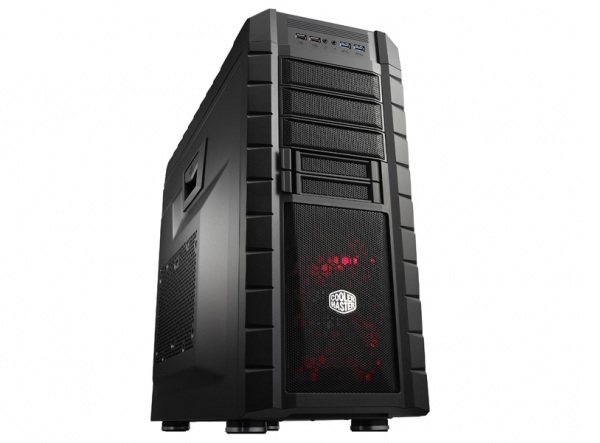
Cooler Master HAF XM
Features
As may be expected from case that sports “high airflow” in its name, the HAFs stand-out feature is the cooling, provided by a range of Cooler Master branded fans. The case features the following fans:
- One front mounted 200 mm LED fan that can be converted to two 120 mm fans or one 140 mm fan
- Two top mounted 200 mm fans that can be converted to two 120 or 140 mm fans
- One rear mounted 140 mm fan that can be converted to a 120mm fan
- One side mounted 200 mm fan that can be converted to two 140mm fans
Each of these fans comes with a three-pin to molex converter, meaning they can be used with either a motherboard fan controller or take power directly from the PSU itself.
The HAF XM also comes with two front docking bays for hard drives, known as x-docking. These hard drives slide in the front of the case, and connect to a two port SATA controller board, powered by a single molex connector.
There is a new 5.25 inch retention clip to keep hard drives in place which is a great improvement on previous versions. A switch on the side flips between the hold and free positions and does so without any great fuss, though it did at times feel a bit flimsy.

Cooler master HAF XM internal
There are 8 expansion slots in typical placement to allow for Nvidia SLI and AMD CrossFireX setups, as well as multiple other expansion cards. There is an additional expansion slot located to the side of the others and rotated by 90 degrees. This is for peripherals that make use of the expansion slot to mount into the case, such as fan or light controllers, typically blocking one of the available motherboard connections.
There is also a power supply cover located at the bottom of the case, placed a bit further back than the actual power supply. This covers the area where the cables come out of the power supply and are exposed before being routed into the rear cable management compartment.
The left side panel of the HAF XM features a hand latch that opens the side panel outwards when the rear screws are removed, while the right side has a typical case panel held in place by rear screws that slides backwards and out to open and reveal the cable management compartment.
Other features include rear water cooling ports for external water cooling, a radiator bracket for 240mm radiators located at the top of the case, and a small compartment at the top of the case towards the front, just behind the power button. This compartment has a rubber inlay, and can be used to store miscellaneous items.
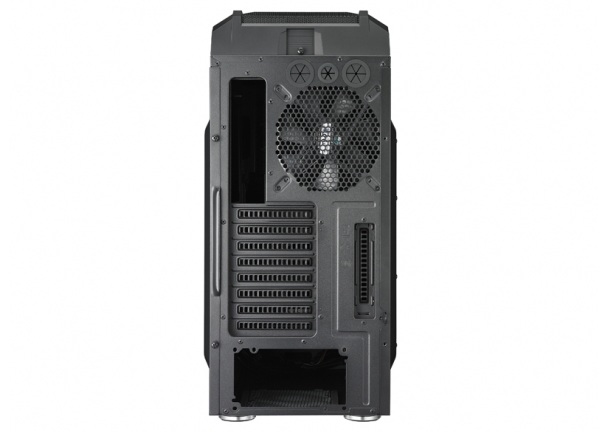
Cooler master HAF XM rear
Installation
Installing a system into the HAF XM is a pleasure. There is a large amount of space in the main compartment, and all but the largest of motherboards will slide in without too much fuss. The same goes for graphics cards; even the longest dual GPU models from AMD and Nvidia fit in without much hassle and without having to remove the hard drive cages.
Speaking of hard drives, the plastic tracks where users will install the hard drives feel flimsy at first, though once the drive is installed the mounting becomes rigid and slides in with ease. The cable management compartment offers a range of conveniently placed openings for cables with rubber grommets to protect the cables as they are routed around the chassis.

Cooler master HAF XM front
Operation
The only criticism aimed at the HAF XM is the noise during operation; the case can become quite loud with all the fans on their maximum speeds. If you’re after a more silent chassis, I’d suggest investing in a fan controller or replacing the fans with lower RPM models.
The good thing about the high airflow however is the ambient case temperature, which is on average around 4c higher than outside the case, on par with the best mid-sized case performance.

Cooler master HAF XM top
Bottom Line
The HAF series from Cooler master is pretty successful, and the XM is a perfect example of why. The case is feature rich, lives up to its high airflow name and bears the HAF series’ signature styling. It can get a bit loud, though this is the sacrifice gamers make for great airflow. Overall, the HAF XM is a fantastic case that comes highly recommended.
Cooler Master HAF XM case review unit was supplied by Sonic Informed – Computer component importer and distributor.






 Loading ...
