



There are tons of gadgets out there designed to do particular things. Some shoes have GPS sensors built into them to track your running progress. A smartphone and an app that takes pictures of your food tells you how many calories there are in it. Others, like remote-controlled robots, could fetch your beer or plate of cookies for you while you recline on the couch at home.
Gadgets, by their very definition, are designed to enhance your abilities and need to be easy to use and small enough to carry with you. But if you’re a geek or the typical MyGaming reader, you already have a few things built into your smartphone, like a GPS chip, a camera, a note-taking app and loads more. What if there’s something you’ve missed that can’t be done with an iPad or a smartphone?
Digital Pens
Humans have been writing on paper for centuries, as far back as 3,000BC starting with papyrus. We’ve emerged out of the dark ages armed with more knowledge, a superior intellect and far more advanced technology, yet we still use the pen and paper in educational facilities as well as the workplace. There’s just no getting rid of it.
But scanning all those documents takes time and if you’re not diligent enough to do it with all the papers you sign and the letters you write, you’ll probably never get to it. With technology, though, we can simplify that.

Using a Digital Pen to draw, and then export, your art.
Digital pens have been around for quite some time and use an accelerometer to monitor what you write on paper. Once you’ve finished, you can switch off the pen and plug it into a USB cable and export the captured data, resulting in perfectly captured handwritten notes that, if legible, can be processed into text through Optical Character Recognition. Some pens even measure pressure sensitivity much better than Wacom digitisers.
You can export mountains of paper into your computer and even accurately record your signature for use on digital documents. If you’re a student, writing notes now automatically makes a back-up copy that you can store somewhere safe, or use for reference when you’re reading through your summaries on your tablet or smartphone.
Twitter-controlled Coffee Machine
You can laugh, but nerds have been trying for years to automate everything. From incremental updates to having robots clean, shower and dress you for work (we can only hope the future is like The Jetsons show), we’ve tried using computers to do the most inane things for us. Your new Playstation may run the latest games with eye-popping clarity, but it still won’t make your coffee.
Or will it? While no-one sells a Ethernet-controlled coffee machine, it’s only a matter of time. Instructables has a quick guide on using conventional hardware to control your coffee machine using the internet. Various methods can be used to control the machine, including e-mail, Twitter or Facebook or even an app on your tablet or smartphone.
The only reason why it isn’t on the market yet? Probably because it requires you to make sure the machine is all topped up before you decide to order some lovely, fresh Mocca Java in the car on your way home.
NO…It won’t play Crysis,
J5 Wormhole USB Switch
As a computer technician, I’m often at pains to swap files from computer to computer. Its why I carry a 250GB USB hard drive around because transferring files over an unoptimised network is painfully slow. Apple made this dead-easy with the Thunderbolt port but there’s apparently nothing like that for Windows desktops. You can’t just pair two computers, swipe and make a few clicks and all your data gets copied over.

J5 Create Wormhole Switch
However, there is something like that now. Its called the J5 Create Wormhole Switch and if the name implies that it blows minds and universes apart, it really does for me. Its a USB adapter that plugs into two USB ports on separate devices. Using the software, one device can control the functions of the other and you can perform data retrieval with a few simple clicks – the software does all the importing for you.
J5 Create says they’re working on a USB 3.0 version. They have several Wormhole versions, all supporting Windows to Windows file transfers as well as Mac to Mac, Windows to Mac, Windows to Android and Windows to iPad file transfers.
The Smart, food-scanning fridge
As a young geek, I realise that at some point I have to leave my parent’s house (again) and venture out (again) into the wilderness that is the outside world. But like any young person, I have a challenge – what the hell do I eat when I get home from work?
You’ve got plenty of stuff in the fridge stocked up by your parents who constantly worry about whether or not you’ll starve and you still have no idea what to eat, especially if you’re hungover.
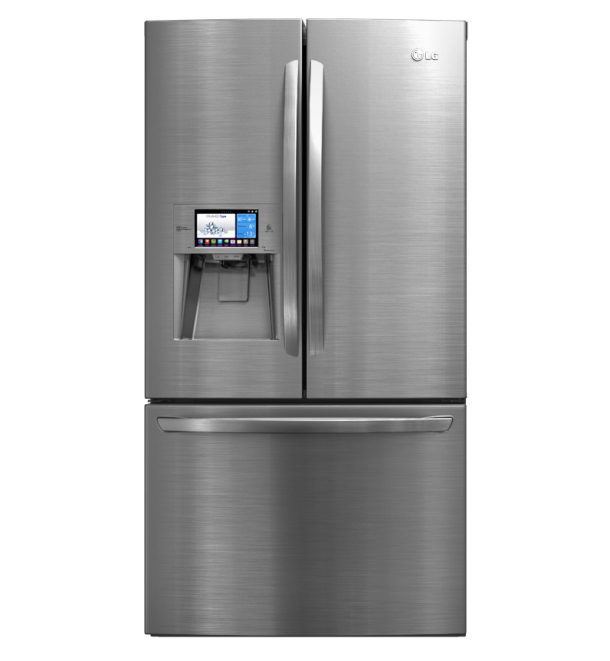
“For supper tonight is fish…fresh, raw and wriggling….!”
Enter the Smart Fridge. Its not a gadget per se, but it is a fridge connected to the internet. It has a 16.7 million-colour LCD with a touch panel loaded with something similar to the Android OS. It uses infra-red scanners and RFID readers to scan your barcodes of the products you’re buying and will occasionally remind you when you’re low on milk, or fresh out of eggs, or if that’s your last piece of takeaway pizza.
The fridge can even interface with your smartphone, and can suggest meals from online sources, automatically order your groceries for you and, if your supermarket supports it, stock up on free coupons so you can save money, all without you lifting a single finger. Everyone goes to the fridge, opens it up and asks themselves, “What’s for supper tonight?…” Once LG finds a way to make the fridge talk, it’ll be super-creepy when it suggests steak and chips to you.
Raspberry Pi
At the heart of all gadgets, though, is a computer. Its small, it probably only does one or two things, but there’s definitely a processor, some embedded memory and some form of Linux on there. But you generally can’t tinker with them. You can’t take apart your smartphone and see what other things it can do. You can’t program your garage door to open using your iPhone without a computer acting as the middle man.

Raspberry Pi Mini-computer
The Raspberry Pi is a low-cost budget programming board that can also act as a computer. You can use a SD card for storage and it’ll run Ubuntu Linux or Raspian OS. Some people have used it as a low-cost computer in third-world countries. Others have used it to serve as the base of their home automation, running everything from the garage doors, sprinkler systems, lights, and even a swimmng pool.
It also helps that it’s a great device for teaching programming to kids and teenagers eager to get into the computing revolution. There’s a school in Cameroon running everything off several Pi units to teach kids how to use computers and software. A professor at Southampton University is using 64 of them together to create a small supercomputer to teach his students the basics of programming supercomputers.
With the Pi, and other machines like it, the possibilities for tinkering are limitless.
More Gadget news:
Nvidia Shield pre-order pricing unveiled






 Loading ...

I’m interested in that wormhole switch, however seeing that it’s only going to give me a max speed of 16mb/sec only 6 more than my network which isn’t too good IMO. Also the price isn’t what I would consider reasonable.
For anyone looking for it I found it here: http://www.takealot.com/computers/computer-accessories-6539/j5-create-juc100-wormhole-switch-for-windows,12838377
This is just the Windows to Windows edition.