



Following part one of our Beginner’s Guide to PC gaming, we present to you the second edition of our “newb’s tutorial” – what makes up a gaming PC?
For the regular PC gamers out there, I am sure you could answer that question in great detail without having to refer to a Wikipedia page. But for those who are new to the scene or are considering making the move to mouse and keyboard, this is an opportunity to learn more about the dark art.
Without further ado, let’s get to it.
Beginner’s Guide Part 2 – What’s inside a gaming PC?
A gaming PC, or any PC for that matter, may seem extremely complex from the outside, but once you isolate the components and investigate what they do, you realise a gaming PC is only very complex. Disheartening, I know.
That being said, you don’t have to wrack your brain too much over the technicalities: for example, you do not have to know exactly how a motherboard works to enjoy its features – just that you need one, and it connects all your components.
Speaking of motherboards and components, behold the innards of a gaming PC.
Motherboard
Your motherboard is like the foundations of a house – it is the base upon which all your components sit. A motherboard consists of many chips, sockets, and ports, some of which include:
- RAM slots
- CPU socket
- LAN, USB, headphone ports
- GPU slots
- SATA ports
It also includes the chips which control how the components “talk” to one another.
There are different motherboards for your different CPU makers – namely Intel and AMD – and there are different chipsets and socket types which determine which CPU and RAM you are able to use.
Good gaming motherboards range in price from R1,000 all the way up to over R7,000 for the new X99 gaming boards.

MSI Z97 Gaming 5
CPU – Central Processing Unit
The Central Processing Unit – commonly known by its abbreviation: CPU – is the brain of the computer, running the show and processing most of the system’s operations.
There are two main players in the CPU arena: AMD and Intel. Intel seems to be preferred by gamers and PC gaming publications, although Sony does use an AMD Jaguar 8-core processor in the PlayStation 4.
As we mentioned in the motherboard section, there are different socket types for different CPUs, while some processors are able to access more/faster RAM than others. The reason you may not recognise a CPU in its simple chip form – like the image below – is that in a PC it is always covered by a heat sink and fan.
CPUs can range in price from R500 to over R13,000 for a Haswell-E 8-core.

Intel Core i7
GPU – Graphics Processing Unit
The Graphics Processing Unit – known as the GPU – is what makes all the pretty pictures appear on your screen. Like CPUs, there are two main players in the world of GPUs: Nvidia and AMD.
Unlike the CPUs, however, the fight over which brand is better is a bit more heated. At the risk of being abused in the comments section and forum, it does seem Nvidia has a slight lead when it comes to popularity among gamers and gaming publications.
Modern PCs are capable of running multiple GPUs at once, giving gamers the option of better graphics and faster frame rates displayed on a single monitor or multiple high-resolution screens. With Nvidia cards this is known as SLI, and with AMD it is called CrossFire.
You may have heard the term “graphics card” or “video card” before, which is basically the GPU on a circuit board with heat sinks and fans attached. The complete package, if you will.
In laptops, these full-on video cards are not used due to size constraints. Instead, the GPU chip is slotted in there and cooled as effectively as possible in the small case.
In even smaller devices, like tablets and smartphones, the GPU and CPU – and many other components – are combined onto a single chip, called a SOC (System on Chip).

Nvidia GeForce GTX 980
RAM – Random Access Memory
RAM (Random Access Memory) is used to read and write data at fast speeds regardless of the order in which the data is accessed. RAM comes in modules – commonly referred to as sticks – in various memory sizes.
Most modern, visually demanding games recommended 8GB of RAM in your rig to play the games smoothly, but serious gamers slot in 16GB, 32GB, or even 64GB to ensure their ultra-high resolution experience is a pleasant one.
The new X99 motherboards, which support Intel’s new Haswell-E processors, can take up to 128GB or RAM. How well your RAM runs also depends on its frequency – which can vary from around 333MHz to 3000MHz.
RAM, depending on the make and frequency, costs between R230 for DDR1 and R12,600 for 16GB of DDR4.

Corsair Dominator Platinum DDR4 RAM
Hard Drives – SSD/HDD
A hard drive is the device which stores all you files on your PC, from games install files to movies, music, and images. It is also home to your operating system, i.e. Windows 7.
These days the term “hard disk drive” refers to the 7200rpm mechanical hard drives which consist of spinning disks and writing arms. While cheaper and larger (in terms of storage space), these mechanical drives play second fiddle to Solid State Drives (SSDs).
Most SSDs use flash-based memory and contain no moving parts. Not only are they faster than mechanical drives, they are quieter and less likely to be damaged by shock.
There’s just one problem- while a 500GB HDD can be bought for around R600, a 500GB SSD will set you back between R4,000 – R5,000.
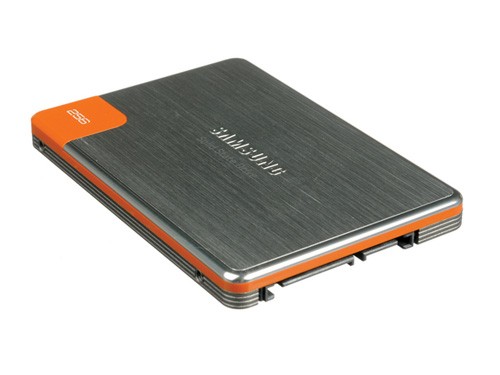
256GB Samsung SSD
Case
If the CPU is the brain of your PC, then the case is its functional/sexy/barely-held-together body. PC cases, also known as towers, come in varying sizes depending on what kind of gaming PC you are looking to build.
Smaller cases are light and portable, which is useful if you want to take your rig to your friend’s house, while bigger cases allow for more hardware and cooling equipment.
Once a case has been selected, you can then go about fitting it with fans, LED lights, perspex viewing panels, handles, decals, designs, and whatever you can fit in or on it.
Gaming cases range in price from R500 to R5,500 for a top-of-the-range Cooler Master.

Corsair C70 Military ATX Gaming Case
PSU – Power Supply Unit
A power supply unit takes the electricity from your wall plug and converts it to the low-voltage energy required to run your PC’s components.
Selecting a power supply is done by first assessing your energy needs, which is measured in watts (W). The more powerful your components, the more power your PSU needs to churn out. As an example, the new Nvidia GeForce GTX 980 draws 165W – combine this with the CPU, fans, etc, and you have your total power requirement.
350W power supplies start at R220, while 1300W PSUs can cost close to R4,000.

Corsair GS800 PSU
Water Cooling
Sometimes the standard heat sinks and fans are not enough, and if you are intent on overclocking your PC you need to keep it cool with liquid.
Water cooling replaces air cooling by adding in a few coolant-filled tubes, a radiator, fans and pumps, and water blocks/heat sinks which can be used to cool specific components of your PC. The liquid coolant absorbs the heat from the component and takes it to a heat exchange point – normally a radiator with a few fans blowing on it.
This removal of heat allows components to pushed to their limits, especially in the case of CPUs and GPUs.
Water cooling is not for beginners from what I have read/been told, so approach this step with caution.
Water cooling sets vary in price depending on how many components you want to chill. A top of the range CPU cooler can cost between R1,500 and R2,000.

Corsair H80i Cooling Unit
Screen/Monitor
Monitor to PC is like HD TV to PlayStation 4 – it is the canvas upon which your PC paints.
Monitors have multiple credentials which much be assessed before you decide whether it is a good fit for your PC. Response time, aspect ratio, resolution, contrast ratio, and price all have to be balanced.
If your PC is powerful enough, you can set up multiple monitors at once and split the video output over them (as pictured below).
The latest trend in screen technology is UHD (sometimes referred to as 4K) implemented into a curved, widescreen monitor. With three screens and this resolution surrounding you while you play Battlefield 4, you will almost taste the blood of defeated opponents
Screens differ greatly in price – a tidy 19-inch LED can be bought for R1,000, while a 27-inch gaming 2560×1440 LED sells for over R15,000.

Samsung Curved Monitors
Keyboard and Mouse
A keyboard and mouse – like the equipment you used to access this article – are the tools used to slay your enemies. Gaming keyboards and mice these days come with multiple programmable buttons that can be assigned functions, million-colour light settings, are made of lightweight material, and some can even be physically altered to suit your hands.
Mice and keyboards start at the R100 mark for something half-decent, and can ascend to around R2,000 for professional grade equipment.

R.A.T TE
Speakers and Headphones
Lastly we have the sound. Depending on your sound needs, you will go for either a set of speakers or a pair of headphones – possibly with a microphone.
Due to the fact that microphones are built into the most gaming headphones, and that neighbours are opposed to loud noises waking up their cats, an over-ear pair of speakers is the popular choice.
If you want bass that blows your clothes off and true surround-sound, though, you need at least a 5.1 set up.
Entry-level gaming headphones and a cheap 2.1 system can be purchased for around the R200 mark, while top-of-the-line speakers and headphones are priced between R3,000 – R4,000.

Steelseries Siberia V2
Did I leave any components out? Let me know in the comments and forum.






 Loading ...

You forgot smoke. See every pc is made right next to a smoke factory and the chassis is sealed with smoke inside. So you know the warranty is void when the smoke escapes the chassis. 😛