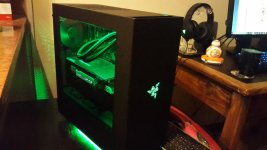
I tried out a new type of case

axon1988

New member
Don't have money for new things, so I tend to spend a lot of time looking at second hand items, especially when it comes to hardware. And recently I got this idea in my head to get a cube case. You know, one of those "it's not as tall as a midi case but fatter than your mom case". So I tried to document the whole process of getting the hardware out of the old case and into the new case, but alas I suck at taking pictures.

I was also a bit preoccupied with just doing something different for once. So pics below... Specs at bottom.

Lets start off by looking at the original case / setup:
S3ZuvPV.jpg

Yeah, very dirty... Rather old and a reasonably cheap case. I don't miss it at all.
I also had 7 fans in that case. Mental I know.

Below you can see the old case on the bottom right. Hardware is already out. New case on couch on left. And my dog Abbey, not impressed with being ignored.
Vs5wXcS.jpg


Below the motherboard and cpu cooler are installed. It's starting to come together. I know the cpu cooler looks really dirty, but it's not. Just a bit dusty, cleaned it as best I could.
REVnl3N.jpg


And here it is finished, not yet plugged in though!
cGX9xeu.jpg

Yes it looks a bit dirty, because it's second hand. The front filter inside cannot be removed, so it seems like dust is there to stay till I remove the grill from the panel.

And finally here it is powered up! First time in a long time where I had an initial boot without any errors or beeps or worrying sounds.
hkc8nVY.jpg


Specs below:
Case is a Thermaltake V21: http://www.thermaltakeusa.com/products-model.aspx?id=C_00002559

Some random facts for y'all:
  • Previous case had 7 fans in it, new one has 4.
  • Cooling is better in new one, around a 4-5 degree difference on cpu and 10-15 degree difference in GPU.
  • This is mostly due to have an intake fan facing the GPU now due to the layout of hardware and movable panels within this glorious case.
  • PSU sits underneath your motherboard, or behind your motherboard depending on how you seat the case and panels.
  • Which might cause some heat issues if your PSU runs cold because it sits a couple of centimeters away from your CPU.
  • But I have had no issues with that at all! :D

The case is great, I would recommend it to anyone.
 
yoh - big box :D

Nice temp drops :)

You know, people keep saying it's big. But I've saved space. Truth be told it is a bit wide, but so damn customizable that it makes it worth it. I barely did any kind of neating up either and most of the wires are out of the way.
 
Quite the meaty cooler for a "2nd hand" pc build ^_^

Congrats on the temp drops, thats (to me anyway) the most important result of all this :)
 
Quite the meaty cooler for a "2nd hand" pc build ^_^

Congrats on the temp drops, thats (to me anyway) the most important result of all this :)

Good eye! That's the original CM Evo right there. Back when I bought it it cost like R250 new or some such. I think that was like 4 years ago now. Could be less, I sometimes forget how old my hardware is.
 
I actually like how it looks! I would just be very worried my with specs in that box concerning temperature. Do you think you will be able to fit any radiators on there or too little space?
 
What are your temps under stress if I may ask. Ambient, CPU and GPU if you have them. Would be interested to see what they look like
 
I actually like how it looks! I would just be very worried my with specs in that box concerning temperature. Do you think you will be able to fit any radiators on there or too little space?

I measured it and I could fit 4 x 180mm dual radiators if I wanted. And if I could get my hands on more pillars that come with the case I could probably go even more overboard. One place I did not measure was the front of the case, though it did actually have space for radiators there as well. The watercooling potential on this case is just stupidly insane.
 
Wait what? 4 x dual radiators? Are you sure you typed that correctly? So 4 x 360l Radiators? O_o
 
What are your temps under stress if I may ask. Ambient, CPU and GPU if you have them. Would be interested to see what they look like

I'll run some tests tonight to make 100% sure. But there are some things I should mention... Room is very hot in summer and very cold in winter. Yeah stupid house... no insulation in ceiling.

So summer and winter temps will differ a huge amount.

From memory:
Ambient CPU is an average of around 40 degrees
Ambient GPU is an average of around 30 degrees

Stress test CPU temp was around 50 to 60 degrees, but I didn't keep a close eye on this and it could be very different. Will have to confirm this one.
Stress test GPU temp was around 63 to 67 degrees from what I remember. Again this would also need to be double checked.
 
I'll run some tests tonight to make 100% sure. But there are some things I should mention... Room is very hot in summer and very cold in winter. Yeah stupid house... no insulation in ceiling.

So summer and winter temps will differ a huge amount.

From memory:
Ambient CPU is an average of around 40 degrees
Ambient GPU is an average of around 30 degrees

Stress test CPU temp was around 50 to 60 degrees, but I didn't keep a close eye on this and it could be very different. Will have to confirm this one.
Stress test GPU temp was around 63 to 67 degrees from what I remember. Again this would also need to be double checked.

if those figures are correct then it is not too bad at all hey
 
Wait what? 4 x dual radiators? Are you sure you typed that correctly? So 4 x 360l Radiators? O_o

There is a chance that I could be wrong. But that's how I understood things. Then again, I've been wrong in the past about these things. But this case can take large radiators on every side panel, top panel and front panel without having to sacrifice space. Only thing I might have to sacrifice is the cpu cooler. Which obviously wouldn't matter in that case any more.

I would recommend you look at reviews to confirm. Like I said, I could be VERY wrong. But from how I was able to install the pillars and measure the holes and spacing it seemed correct to me.
 
Awesome movie btw!

So keen for it! :D

Oh here are the specs for the case, seems I am very wrong:

P/N CA-1D5-00S1WN-00
Case Type Micro Case
Dimension (H x W x D) 336 x 320 x 424 mm
(13.2 x 12.6 x 16.7 inch)
Net Weight 6.5 kg / 14.3 lb
Side Panel Transparent Window
Color Exterior & Interior : Black
Material SPCC
Cooling System Front (intake) :
200 x 200 x 30 mm fan (800rpm, 13dBA)
Drive Bays -Hidden : 3 x 3.5’’ or 2.5” , 3 x 2.5’’
Expansion Slots 5
Motherboards 6.7” x 6.7” (Mini ITX) , 9.6” x 9.6” (Micro ATX)
I/O Ports USB 3.0 x 2, HD Audio x 1
PSU Standard PS2 PSU (optional)
LCS Upgradable Supports 1/2”、3/8”、1/4” water tube
Fan Support Front:
1 x 120mm or 2 x 120mm
1 x 140mm or 2 x 140mm
1 x 200mm
Top:
1 x 120mm or 2 x 120mm or 3 x 120mm or 4 x 120mm
1 x 140mm or 2 x 140mm
Rear:
1 x 120mm
1 x 140mm
Bottom:
1 x 120mm or 2 x 120mm
Left / Right Side:
1 x 120mm or 2 x 120mm
1 x 140mm or 2 x 140mm
Radiator Support
Front:
1 x 120mm or 1 x 240mm
1 x 140mm
Top:
2 x 120mm or 2 x 240mm
1 x 140mm or 1 x 280mm
Rear:
1 x 120mm
Left / Right Side:
1 x 120mm or 1 x 240mm
1 x 140mm or 1 x 280mm
Clearance CPU cooler height limitation: 185mm
VGA length limitation: 350mm
PSU length limitation: 200mm (With Bottom Fan)

That's what 3 x 280mm radiators?
 
So keen for it! :D

Oh here are the specs for the case, seems I am very wrong:

P/N CA-1D5-00S1WN-00
Case Type Micro Case
Dimension (H x W x D) 336 x 320 x 424 mm
(13.2 x 12.6 x 16.7 inch)
Net Weight 6.5 kg / 14.3 lb
Side Panel Transparent Window
Color Exterior & Interior : Black
Material SPCC
Cooling System Front (intake) :
200 x 200 x 30 mm fan (800rpm, 13dBA)
Drive Bays -Hidden : 3 x 3.5’’ or 2.5” , 3 x 2.5’’
Expansion Slots 5
Motherboards 6.7” x 6.7” (Mini ITX) , 9.6” x 9.6” (Micro ATX)
I/O Ports USB 3.0 x 2, HD Audio x 1
PSU Standard PS2 PSU (optional)
LCS Upgradable Supports 1/2”、3/8”、1/4” water tube
Fan Support Front:
1 x 120mm or 2 x 120mm
1 x 140mm or 2 x 140mm
1 x 200mm
Top:
1 x 120mm or 2 x 120mm or 3 x 120mm or 4 x 120mm
1 x 140mm or 2 x 140mm
Rear:
1 x 120mm
1 x 140mm
Bottom:
1 x 120mm or 2 x 120mm
Left / Right Side:
1 x 120mm or 2 x 120mm
1 x 140mm or 2 x 140mm
Radiator Support
Front:
1 x 120mm or 1 x 240mm
1 x 140mm
Top:
2 x 120mm or 2 x 240mm
1 x 140mm or 1 x 280mm
Rear:
1 x 120mm
Left / Right Side:
1 x 120mm or 1 x 240mm
1 x 140mm or 1 x 280mm
Clearance CPU cooler height limitation: 185mm
VGA length limitation: 350mm
PSU length limitation: 200mm (With Bottom Fan)

Yeah jsut saw that. So not wuite as much as you said. but still very good.

Is you pc stadning the way it is now? Try standing it the way it was designed. And check temps then. Might even be better, Airflow is not confused. The window should be to the side, and mobo level with the table, with GPU standing upright. Or are there different ways to mount the Mobo? From everything I see the mobo is level, and the GPU upright. but from your pics it does not seem like that is possible
 
Yeah jsut saw that. So not wuite as much as you said. but still very good.

Is you pc stadning the way it is now? Try standing it the way it was designed. And check temps then. Might even be better, Airflow is not confused. The window should be to the side, and mobo level with the table, with GPU standing upright. Or are there different ways to mount the Mobo? From everything I see the mobo is level, and the GPU upright. but from your pics it does not seem like that is possible

Mobo is currently lying flat, with CPU and GPU resting on it. But you can move the panels and put it in such a way that the motherboard would be the same way it is with a midi tower. The whole idea behind the case is the ability to build it up the way you want to. You can even buy 2 of these cases and stack them on top of each other to create one massive tower. It even comes with these clips that allow for that. The front OI board can also be moved to 3 different positions, you can have the USB / power to the side like I do. Or on the top, or on the opposite side. And this is with minimal effort. Same goes for internal harddrive rack and SSD rack.
 
Mobo is currently lying flat, with CPU and GPU resting on it. But you can move the panels and put it in such a way that the motherboard would be the same way it is with a midi tower. The whole idea behind the case is the ability to build it up the way you want to. You can even buy 2 of these cases and stack them on top of each other to create one massive tower. It even comes with these clips that allow for that. The front OI board can also be moved to 3 different positions, you can have the USB / power to the side like I do. Or on the top, or on the opposite side. And this is with minimal effort. Same goes for internal harddrive rack and SSD rack.

Okay that is AWESOM! My Case now looks baby compared to that!

20160106_045556.jpg
20160117_191847.jpg
 
Back
Top