axon1988
New member
Don't have money for new things, so I tend to spend a lot of time looking at second hand items, especially when it comes to hardware. And recently I got this idea in my head to get a cube case. You know, one of those "it's not as tall as a midi case but fatter than your mom case". So I tried to document the whole process of getting the hardware out of the old case and into the new case, but alas I suck at taking pictures.
I was also a bit preoccupied with just doing something different for once. So pics below... Specs at bottom.
Lets start off by looking at the original case / setup:

Yeah, very dirty... Rather old and a reasonably cheap case. I don't miss it at all.
I also had 7 fans in that case. Mental I know.
Below you can see the old case on the bottom right. Hardware is already out. New case on couch on left. And my dog Abbey, not impressed with being ignored.

Below the motherboard and cpu cooler are installed. It's starting to come together. I know the cpu cooler looks really dirty, but it's not. Just a bit dusty, cleaned it as best I could.

And here it is finished, not yet plugged in though!

Yes it looks a bit dirty, because it's second hand. The front filter inside cannot be removed, so it seems like dust is there to stay till I remove the grill from the panel.
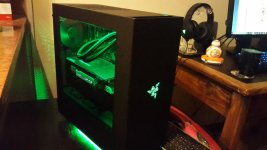
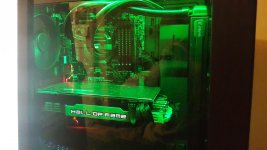
And finally here it is powered up! First time in a long time where I had an initial boot without any errors or beeps or worrying sounds.

Specs below:
Case is a Thermaltake V21: http://www.thermaltakeusa.com/products-model.aspx?id=C_00002559
Some random facts for y'all:
The case is great, I would recommend it to anyone.
I was also a bit preoccupied with just doing something different for once. So pics below... Specs at bottom.
Lets start off by looking at the original case / setup:
Yeah, very dirty... Rather old and a reasonably cheap case. I don't miss it at all.
I also had 7 fans in that case. Mental I know.
Below you can see the old case on the bottom right. Hardware is already out. New case on couch on left. And my dog Abbey, not impressed with being ignored.
Below the motherboard and cpu cooler are installed. It's starting to come together. I know the cpu cooler looks really dirty, but it's not. Just a bit dusty, cleaned it as best I could.
And here it is finished, not yet plugged in though!
Yes it looks a bit dirty, because it's second hand. The front filter inside cannot be removed, so it seems like dust is there to stay till I remove the grill from the panel.
And finally here it is powered up! First time in a long time where I had an initial boot without any errors or beeps or worrying sounds.
Specs below:
Case is a Thermaltake V21: http://www.thermaltakeusa.com/products-model.aspx?id=C_00002559
Some random facts for y'all:
- Previous case had 7 fans in it, new one has 4.
- Cooling is better in new one, around a 4-5 degree difference on cpu and 10-15 degree difference in GPU.
- This is mostly due to have an intake fan facing the GPU now due to the layout of hardware and movable panels within this glorious case.
- PSU sits underneath your motherboard, or behind your motherboard depending on how you seat the case and panels.
- Which might cause some heat issues if your PSU runs cold because it sits a couple of centimeters away from your CPU.
- But I have had no issues with that at all!

The case is great, I would recommend it to anyone.