Broadcasting gaming on Twitch.tv


I should stream from work.

Looking into going 10meg as soon as ya'll have difinitive results.
I saw your stream yesterday while you were fideling with things and it looked prett decent to me.
Im not worried about 720 in the least.
 
yeah I should also stream from work

2946743738.png


Thing is that it's so hard to check the stream properly while you actually doing it... I upped the res and dropped the bitrate towards the end so I wonder which settings you were looking at :confused:

Im gonna put the res back down to the lowest setting, crank the quality setting to 10 (CBR), MKV priority to slowest (for most encoding/more cpu power). I usually make the bitrate the same as the buffer.

Not gonna be able to test tonight, will see though.
 
Last edited:
Very interested to see your outcomes. At the moment my OBS settings are:

Encoding Tab
Use CBR - checked
Enable CBR padding - unchecked
Max Bitrate - 480|Buffer Size - 480
Use Custom Buffer Size - checked
Codec - AAC|Bitrate - 48
Video Tab
Resolution downscale to 2.25(852x480)
FPS 29
Disable Aero
AdvancedTab
Use Multithreaded Op - checked
Process Prio Class - normal
Scene Buffering time - 400
x264 CPU Preset - Medium
Keyframe - 2

2944887780.png


GTX770, i5 @ 4.5GHz, 8GB, SSD, Win7

From what I can gather / based on friends feedback, the stream is pretty good. Text is a little blurry, but overall not bad for 480p. Just wish I could stream at 720p.


Quality balance defaults to 10 when you use CBR, but I think its variable ie changes on the fly.

From what I understand, CBR (Constant bit Rate) will stay at the specific bitrate you have chosen, hence the slow downs and speed ups on some lines (it's using everything that is available). If VBR (Variable bit rate) was used it would greatly assist if you had more bandwidth but then it would also negatively affect the stream if your line was to slow down a bit. - This would cause frame lag, and everyone watching would get a choppy video.

CBR takes everything that is available to you and uses it. It is also a little harder to use VBR with Twitch's system as it is doing a 1:1 playback. What you are recording is going straight to Twitch's servers and broadcast.
 
I'd really like to do some more testing, but I just dont have the time at the moment and certainly not going to have the time this weekend. It's my birthday tomorrow so busy busy busy :)

What I can report so long, is that going with the lowest resolution is going to be the best bet. I have a base resolution of 1920x1200 so I run a downscale of 2.5 which means I'm streaming at 768x480 ie.480p. I decided that it would be best to go with a lower resolution, and a higher bitrate. Bitrate testing to follow

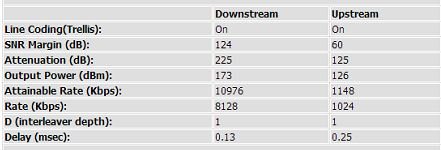
What I can also report so long, is that your line stats are also going to have a big impact on your streaming capability. Mine below

line stats.JPG

You need a quality connection to be able to upload using the most of your line, without adversely affecting your ping. There is absolutely no point in streaming a MOBA but your ping goes to hell coz you streaming. Then you gonna be useless to the team. Im gonna start doing some tests comparing the effect on the ping vs bitrate.

I have a solid 159/160ms ping to EU, and I keep a window open monitoring it at all times. I also have Netlimiter open, making sure that I can keep an eye on the real time Upload speed (easy to read compared to OBS)

I also found that with games of these nature, they are pretty easy going on the CPU. I have a i5 2500k at stock, and IM running the x264 processing at "slowest". This encodes the video the most, hence more load on the CPU. My reason for this is that we can get some more quality for the same bitrate, if you know what I mean. If uplink wasnt such an issue we could crank the bitrate and keep the CPU load down, but we dont have that luxury. Uplink is scarce, so more encoding/pre-processing the better.

More to follow...
 
I'd really like to do some more testing, but I just dont have the time at the moment and certainly not going to have the time this weekend. It's my birthday tomorrow so busy busy busy :)

What I can report so long, is that going with the lowest resolution is going to be the best bet. I have a base resolution of 1920x1200 so I run a downscale of 2.5 which means I'm streaming at 768x480 ie.480p. I decided that it would be best to go with a lower resolution, and a higher bitrate. Bitrate testing to follow

What I can also report so long, is that your line stats are also going to have a big impact on your streaming capability. Mine below

View attachment 6891

You need a quality connection to be able to upload using the most of your line, without adversely affecting your ping. There is absolutely no point in streaming a MOBA but your ping goes to hell coz you streaming. Then you gonna be useless to the team. Im gonna start doing some tests comparing the effect on the ping vs bitrate.

I have a solid 159/160ms ping to EU, and I keep a window open monitoring it at all times. I also have Netlimiter open, making sure that I can keep an eye on the real time Upload speed (easy to read compared to OBS)

I also found that with games of these nature, they are pretty easy going on the CPU. I have a i5 2500k at stock, and IM running the x264 processing at "slowest". This encodes the video the most, hence more load on the CPU. My reason for this is that we can get some more quality for the same bitrate, if you know what I mean. If uplink wasnt such an issue we could crank the bitrate and keep the CPU load down, but we dont have that luxury. Uplink is scarce, so more encoding/pre-processing the better.

More to follow...

Thanks for the info. I might try some testing and ensure that twitch saves the vids so i can review them.

Happy BDay in advance.
 
Thanks for the info. I might try some testing and ensure that twitch saves the vids so i can review them.

Happy BDay in advance.

From what I can tell, Twitch saves everything for you by default. After a while it will do a clean-out and delete very old vids. The way to get around this would be to edit a vid, then save it. This would exclude it from the Twitch "clean-up"

I assume you using OBS? Just save the file to hard drive, that way you can review locally. Much easier.

On another note, I've been doing some research on various feeds using this handy tool. http://r-1.ch/analyze-twitch-vod.php

I highly recommend it. If you want to see details on a specific Twitch stream.
 
From what I can tell, Twitch saves everything for you by default. After a while it will do a clean-out and delete very old vids. The way to get around this would be to edit a vid, then save it. This would exclude it from the Twitch "clean-up"

I assume you using OBS? Just save the file to hard drive, that way you can review locally. Much easier.

On another note, I've been doing some research on various feeds using this handy tool. http://r-1.ch/analyze-twitch-vod.php

I highly recommend it. If you want to see details on a specific Twitch stream.

I thought about saving it but then would that give the same results as you would see on your stream with line jitter and such taken into account.

Checking both ways wouldnt hurt i guess.

EDIT: On the viewing side of things, when twitch decides it doesn't wanna stream 720 for you have a look here :
http://www.reddit.com/r/DotA2/comments/1gqfy7/twitch_lag_a_fix_that_worked_for_me/
 
I thought about saving it but then would that give the same results as you would see on your stream with line jitter and such taken into account.

Checking both ways wouldnt hurt i guess.

EDIT: On the viewing side of things, when twitch decides it doesn't wanna stream 720 for you have a look here :
http://www.reddit.com/r/DotA2/comments/1gqfy7/twitch_lag_a_fix_that_worked_for_me/

yup, Im gonna make some hard drive streams, increasing bitrate in 100kbps steps. Will probably make 300 through to 600, hopefully higher but will see. Quite keen to get home and give it a whirl
 
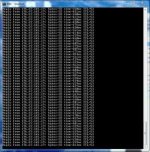
Not a viable ping on settings :

25 fps - slower - 500 bitrate and 500 buffer

25fps - slower - 500 - 500.jpg

- - - Updated - - -

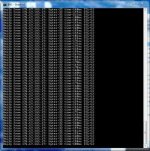
same story

25 fps - slower - 300 bitrate and 300 buffer

25fps - slower - 300 - 300.jpg

- - - Updated - - -

ai... so disappointing... upload link is just not enough for this kind of thing.

sigh :(
 
ok so this it. I have thrown in the towel with this whole streaming thing. The bottom line is that you need at least 900kbps for it to look HALF decent. The problem we face is that while 900kbps CBR is possible, the effect it has on the ping is not sustainable. Pics posted already.

Until I get VDSL or something, Im not gonna waste any more time on it.

Internet sucks donkey balls here man :/
 
Okay so I'm reviving this thread.

I have the chance to upgrade from a 10mb to a 20mb line. That'll give me an upload speed of around 2mb. Probably hanging around 1.8mb.

I should definitely be able to stream at say 480p, correct? Games like WoW and Battlefield 4.
 
Okay so I'm reviving this thread.

I have the chance to upgrade from a 10mb to a 20mb line. That'll give me an upload speed of around 2mb. Probably hanging around 1.8mb.

I should definitely be able to stream at say 480p, correct? Games like WoW and Battlefield 4.

Most definetly. With my 0.5meg upload I can stream 360p with some slight lag and a huge delay... You should have smooth streaming and a slightly lower delay.

If you start streaming often please link you twitch and I will come and watch :)
 
Seeing as this has been necroed im trying to stream(albeit on a 4mb line) but im nto 100% how to use obs and xsplit for soem reason i cant get it to stream the ingame sound ? any help
 
Seeing as this has been necroed im trying to stream(albeit on a 4mb line) but im nto 100% how to use obs and xsplit for soem reason i cant get it to stream the ingame sound ? any help

Check in your settings the sound sources.

Obs is very simple. You should not have many problems with it but if you do they are generally easy to fix.
 
Check in your settings the sound sources.

Obs is very simple. You should not have many problems with it but if you do they are generally easy to fix.
when i say problems its jsut i want to get the best quality i can(trust me i dont expect miracles on a 4mb) but i jsut was a bit confused abotu how to set the resolution lower and things
 
when i say problems its jsut i want to get the best quality i can(trust me i dont expect miracles on a 4mb) but i jsut was a bit confused abotu how to set the resolution lower and things

Go into settings...

Make sure your bit rate is not super high (check bitrate to 360p or something) video for res, audio for sounds, etc
 
Most definetly. With my 0.5meg upload I can stream 360p with some slight lag and a huge delay... You should have smooth streaming and a slightly lower delay.

If you start streaming often please link you twitch and I will come and watch :)

Upgrade should be done by the middle of next week then I'll link my Twitch account.
 
With about 0.8mb up I can stream 480p perfectly fine but 480p is just that...

720p is where you want to be in an ideal world. If 40mbps prices every drop to a slightly more affordable level, I would pick one up in a heartbeat purely for the +3mbps upload speed. I care nothing for download speeds at all... I wish the wizards of telecomms in SA could create a 4mbps up / 4mps down account or something... And I continue to wish.

Duckknuckle, when looking at SP games, you could even try upping your bitrate to 1800 or more and you should be able to stream in 720p I reckon. For example, I tried surgeon simulator the other day and was able to crank my bitrate on OBS to 600 or so. Because there is no dependance on server latency, you can use more of your line to upload therefore improving quality.

Then again, a high quality 480p stream is better than a terrible quality 720p stream.
 
Back
Top