Applause
New member
If anyone wants this great software...
You can find it here: http://obsproject.com/
You can find it here: http://obsproject.com/


Very interested to see your outcomes. At the moment my OBS settings are:
Encoding Tab
Use CBR - checked
Enable CBR padding - unchecked
Max Bitrate - 480|Buffer Size - 480
Use Custom Buffer Size - checked
Codec - AAC|Bitrate - 48
Video Tab
Resolution downscale to 2.25(852x480)
FPS 29
Disable Aero
AdvancedTab
Use Multithreaded Op - checked
Process Prio Class - normal
Scene Buffering time - 400
x264 CPU Preset - Medium
Keyframe - 2

GTX770, i5 @ 4.5GHz, 8GB, SSD, Win7
From what I can gather / based on friends feedback, the stream is pretty good. Text is a little blurry, but overall not bad for 480p. Just wish I could stream at 720p.
Quality balance defaults to 10 when you use CBR, but I think its variable ie changes on the fly.

I'd really like to do some more testing, but I just dont have the time at the moment and certainly not going to have the time this weekend. It's my birthday tomorrow so busy busy busy
What I can report so long, is that going with the lowest resolution is going to be the best bet. I have a base resolution of 1920x1200 so I run a downscale of 2.5 which means I'm streaming at 768x480 ie.480p. I decided that it would be best to go with a lower resolution, and a higher bitrate. Bitrate testing to follow
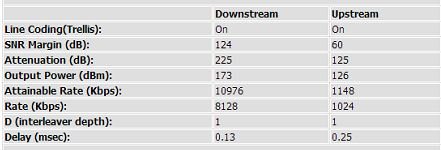
What I can also report so long, is that your line stats are also going to have a big impact on your streaming capability. Mine below
View attachment 6891
You need a quality connection to be able to upload using the most of your line, without adversely affecting your ping. There is absolutely no point in streaming a MOBA but your ping goes to hell coz you streaming. Then you gonna be useless to the team. Im gonna start doing some tests comparing the effect on the ping vs bitrate.
I have a solid 159/160ms ping to EU, and I keep a window open monitoring it at all times. I also have Netlimiter open, making sure that I can keep an eye on the real time Upload speed (easy to read compared to OBS)
I also found that with games of these nature, they are pretty easy going on the CPU. I have a i5 2500k at stock, and IM running the x264 processing at "slowest". This encodes the video the most, hence more load on the CPU. My reason for this is that we can get some more quality for the same bitrate, if you know what I mean. If uplink wasnt such an issue we could crank the bitrate and keep the CPU load down, but we dont have that luxury. Uplink is scarce, so more encoding/pre-processing the better.
More to follow...
Thanks for the info. I might try some testing and ensure that twitch saves the vids so i can review them.
Happy BDay in advance.
From what I can tell, Twitch saves everything for you by default. After a while it will do a clean-out and delete very old vids. The way to get around this would be to edit a vid, then save it. This would exclude it from the Twitch "clean-up"
I assume you using OBS? Just save the file to hard drive, that way you can review locally. Much easier.
On another note, I've been doing some research on various feeds using this handy tool. http://r-1.ch/analyze-twitch-vod.php
I highly recommend it. If you want to see details on a specific Twitch stream.
I thought about saving it but then would that give the same results as you would see on your stream with line jitter and such taken into account.
Checking both ways wouldnt hurt i guess.
EDIT: On the viewing side of things, when twitch decides it doesn't wanna stream 720 for you have a look here :
http://www.reddit.com/r/DotA2/comments/1gqfy7/twitch_lag_a_fix_that_worked_for_me/
yeah I should also stream from work


Okay so I'm reviving this thread.
I have the chance to upgrade from a 10mb to a 20mb line. That'll give me an upload speed of around 2mb. Probably hanging around 1.8mb.
I should definitely be able to stream at say 480p, correct? Games like WoW and Battlefield 4.
Seeing as this has been necroed im trying to stream(albeit on a 4mb line) but im nto 100% how to use obs and xsplit for soem reason i cant get it to stream the ingame sound ? any help

when i say problems its jsut i want to get the best quality i can(trust me i dont expect miracles on a 4mb) but i jsut was a bit confused abotu how to set the resolution lower and thingsCheck in your settings the sound sources.
Obs is very simple. You should not have many problems with it but if you do they are generally easy to fix.
when i say problems its jsut i want to get the best quality i can(trust me i dont expect miracles on a 4mb) but i jsut was a bit confused abotu how to set the resolution lower and things
Most definetly. With my 0.5meg upload I can stream 360p with some slight lag and a huge delay... You should have smooth streaming and a slightly lower delay.
If you start streaming often please link you twitch and I will come and watch