Thread of PC Woes, Troubles, Problems, and Issues

Hi Shadow, thanks for your reply. I replaced the PSU with a new 700w Huntkey, still no luck. I really think that my CPU (i5-760), with a P55 mobo are the problem. Going to have to upgrade soon in any event. I'll try and find someone to test the card as well.

I'd recommend testing the card first though. It's unlikely that your mobo or CPU are the cause if the old card still works fine. If it is one of those two, then it's probably the motherboard, although as Havoc pointed out the card should be backward compatible.
 
-Your m/b doesn't have integrated graphics, right? I had some trouble recently with my BIOS being unable to decide which display output it wanted to use.

Hi Bromster, thanks for your thoughts. The mobo doesn't have an integrated graphics card.

-The fact that it POSTS with an old card and not a new one must mean the BIOS is having some trouble figuring out what card you put in. Another option might be to go into bios and specify the primary display device as PCI-Ex 16. (i.e not 'Auto')

Thanks will try this.

-Another long shot might be to put your old vga card in, boot to safe mode, uninstall ALL VGA drivers via device manager. Then reboot.

Haven't tried this yet, but the boot sequence doesnt get past the Intel scrren.


-And of course there is the blatantly obvious question of: "Did you plug it in the right hole?" :)

Lol, yes I believe it is - same slot as where the old card was plugged into.
 
I'd recommend testing the card first though. It's unlikely that your mobo or CPU are the cause if the old card still works fine. If it is one of those two, then it's probably the motherboard, although as Havoc pointed out the card should be backward compatible.

Thanks, will try and find someone to test the card for me.
 
So recently I've gotten myself a new graphics card (Twin Frozr iii R7950 to be exact) but i've been having some trouble with its temp. My previous card, 6770 use to idle around 45C which i wasn't that bothered with. But with the new card i've noticed it idle at around 50C which seems weird to me.

I don't know if i'm missing anything but as far as i know it shouldn't be that high? Could it be that i'm mistaken and the 50C is normal or should i be concerned?

I can't remember what the temp spiked at during gaming last night but will test again tonight at post it here. I would just like to know if anyone else knows of a solution. I've googled, but my skills kind of failed :(

Found this.They say 31 idle and 60 under load. Seems your going to invest in some better fans into your case.
http://www.guru3d.com/articles_pages/msi_radeon_hd_7950_twin_frozer_iii_review,9.html
 
Found this.They say 31 idle and 60 under load. Seems your going to invest in some better fans into your case.
http://www.guru3d.com/articles_pages/msi_radeon_hd_7950_twin_frozer_iii_review,9.html

I thought it might have to do with the airflow. Already have 5 120mm running but could be that somewhere i'm getting a dead spot which causes some issues. Will have a look tonight and remove the side panel. Maybe i get some better temps then. Thanks waco :)


Edit: So after a few moving around of the side panel fans making them intake fans the temp dropped a whopping... 2 degrees :confused:

But one good thing i've noticed is that under load the temp does not rise above 60C. Basically a 10C increase when playing games. I guess i can live with that but still 50C on idle doesn't seem right tbh
 
Last edited:
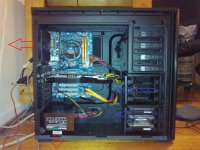
Cronus can you post a pic of a diagram, how your setup is?

http://i.imgur.com/blkGm.png?1

Note: Just ignore the extra top fan. I only have one extraction fan at the top of my case


Edit: so after some searching on the interwebs i found a few people having the same issue i due. Turns out we all have one thing in common; dual monitors. So i decided i'll unplug the one monitor and leave the system to idle for a bit.

Turns out they might of been on to something. The temp dropped to 41C and stays there steady. I'll wait a few hours and then plug my other monitor back in and see if the temp goes up.
 
Last edited:
So recently I've gotten myself a new graphics card (Twin Frozr iii R7950 to be exact) but i've been having some trouble with its temp. My previous card, 6770 use to idle around 45C which i wasn't that bothered with. But with the new card i've noticed it idle at around 50C which seems weird to me.

I don't know if i'm missing anything but as far as i know it shouldn't be that high? Could it be that i'm mistaken and the 50C is normal or should i be concerned?

I can't remember what the temp spiked at during gaming last night but will test again tonight at post it here. I would just like to know if anyone else knows of a solution. I've googled, but my skills kind of failed :(

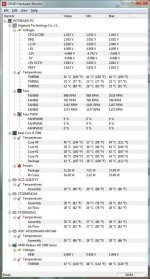
Also recently got a 7950, the sapphire flex. Here is a pic of my temps after idleing for about 10min. The idle temp is quite high it seems. This is running 1 monitor by the way.

temps.jpg
 
Also recently got a 7950, the sapphire flex. Here is a pic of my temps after idleing for about 10min. The idle temp is quite high it seems. This is running 1 monitor by the way.

How's the air flow in your case? something like this

blkGm.png
 
So last night while playing FarCry 3, I noticed my CPU temp going up to about 73 degrees... I think it's time for a closed loop water cooler...


Is the H100 so much better than the H80? I am looking at getting either of these... Have the CM690 II case so have space for the H100.

mmm...
 
Does anyone know what happened to the Joker? I was looking for advice from him but he's been gone for quite a while now. Hope he's OK.
 
Thread of PC Woes/Troubles/Problems/Issues

Does anyone know what happened to the Joker? I was looking for advice from him but he's been gone for quite a while now. Hope he's OK.

I know that he has been struggling with his health for the last while and has been in and out of hospital. Could explain his absence from the forum.
 
I think your PSU sucks air from the bottom and blows it out the back though... not the way you drew it...

You can even add a fan at the bottom, suck air into the case and blowing it upwards.. then add one sucking the air out the top...

Top extractor fans are quite good to have, remember, hot air rises!
 
I think your PSU sucks air from the bottom and blows it out the back though... not the way you drew it...

You can even add a fan at the bottom, suck air into the case and blowing it upwards.. then add one sucking the air out the top...

Top extractor fans are quite good to have, remember, hot air rises!

Ahh my bad, thought it was the other way round. I rekon I'll only add top fans if I start seeing temps of around 85. Want to try keep my machine as quiet as possible.
 
Ahh my bad, thought it was the other way round. I rekon I'll only add top fans if I start seeing temps of around 85. Want to try keep my machine as quiet as possible.

You don't have to worry about noise if you get the right type of fan. I bought myself these and they work perfectly. You even get a voltage reduction cable with the fans to make them run in "silent mode". They push a big volume of air and you hardly hear them :)

I think i found these in a little pc shop in durbanville a few years back and they weren't that expensive either. But seeing that your in PE you might want to have a look around town for some hidden jems
 
Top extractor fans are quite good to have, remember, hot air rises!
Not a factor in case airflow. Air needs to be near perfectly still for that to influence matters.

Knob...focus on large fans....as big as you can fit in & then make them move slowly. Also placing the case behind a solid desk (as opposed to on top/below/next to) makes a remarkably large difference noise wise.
 
Cool shot for input guys. Yeah, One weekend I'll have to go round too all the brick and mortar pc shops around here looking for clearance stock :P
 
Not a factor in case airflow. Air needs to be near perfectly still for that to influence matters.

Knob...focus on large fans....as big as you can fit in & then make them move slowly. Also placing the case behind a solid desk (as opposed to on top/below/next to) makes a remarkably large difference noise wise.

I reject your reality and substitute my own!!! :)

Yeah, although that seems right, and makes sense, there are spots in my case where airflow is minimal to none... especially above my CPU, as the fan pulls from the left but the hot air rises and not all gets sucked out the top. I can feel for example, that the top of my case is hot, so there's definitely hot air getting there...

Add a fan and get rid of it :)
 
Back
Top