



Following our (Console) gaming problems of the 90s article some time ago, there was a lot of talk in the comments section about how difficult it was to game on a PC during that decade.
Being the attentive and caring individuals that we are, we could not let these issues go unnoticed and unpublished. MyGaming therefore presents: PC gaming problems of the 90s – where getting your mouse to work was ofttimes more difficult than the rollercoaster-maze puzzle in Myst.
Here are some of the problems gamers faced in the build-up to the new millennium.
The Internet sucked

Feel the speed.
If you were one of the privileged few who had access to the Interwebs in the 90s, you knew that a 10MB “major patch” would mean you would have to spend your entire weekend waiting for the precious files to download.
Connecting to a friend’s PC through a 56K modem was not exactly a pleasant experience either, and often – even after many hours – your direct-dial multiplayer game of Age of Empires or Diablo was still not ready to go.
Your mouse ran on a ball

My mouse only has one ball – tragic.
Your ball mouse – or trackball – picked up more filth than most garbage men. When you noticed that performance your mouse wasn’t responding properly, you had to turn it over, unscrew the cover, and take that dust-covered ball of disease out and give it a clean.
After that was done, its housing and those three little wheels needed a scrubbing as well. If it wasn’t bad enough that the technology was mechanical, you had to contend with the clean up job, too.
Copying games required WinZip and multiple stiffies

Windows Stiffy
If you wanted to copy a game from a friend [er… nowadays we call that “piracy” – Ed], you better have brought multiple stiffy disks (the rest of the world incorrectly called these 3.5″ floppies) with you and have access to WinZip or WinRAR. If you didn’t have one of those eternally useful tools (or Windows, for that matter), then it was the command line and good old PKZIP (or maybe ARJ if you were that way inclined) for you.
Once you had successfully copied over the data and got back home, invariably one disk would be corrupt and your day’s work would have been wasted.
No extrnal 2TB 2.5-inch USB 3 drives — it was torture.
Networking
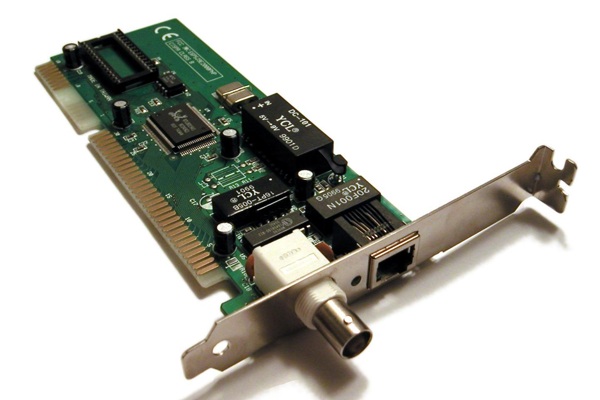
10Base-2 coaxial Ethernet network interface card
A home Wi-Fi network is something many connected households take for granted nowadays. Hooking computers up to a local area network (LAN) wasn’t always so easy, however.
Before the advent of Intel’s Centrino processor and the subsequent widespread adoption of the wireless LAN standard known today as Wi-Fi, we preferred a more honest communications medium – ye faithful copper cable.
I’m not talking about the 8P8C (commonly called the RJ-45 or CAT5/CAT6 Ethernet) connector still in use today. My first LAN ran at a blazing 10Mbps over 10Base-2 coaxial cable, needed a special “T-piece” for every network card, and two 50 ohm terminators at either end of the line. If one cable, T-piece, or terminator was faulty, the whole network went on the fritz.
Configuring CONFIG.SYS and AUTOEXEC.BAT files to get the maximum out of your RAM

CONFIG.SYS (screenshot from the Ancient Electronics blog)
So you think you’re hard-core for knowing your GTX 980 from your R9 290X? Maybe you even know your way around an overclocker’s liquid nitrogen cooling rig.
That’s mildly impressive and all, but you haven’t tasted the bittersweet pleasure of 90s PC gaming unless you’ve had to try and free up “conventional memory” so that your games would run in DOS.
You see, before this so-called “Glorious PC Gaming Master Race” had its hand held by Windows and Steam, we had to work for our games. IBM and Microsoft made us walk barefoot over a 10km stretch of thorn-crusted wasteland to get to the good stuff.
The existence of conventional memory is a long story which involves the Intel 8088 processor and IBM’s need to maintain backward compatibility with old programs on newer machines, which I’ll spare you from listening to this time (if you really want to know, go check out the Wikipedia article).
Suffice it to say that if you wanted to use your mouse and Sound Blaster in DOS games while running an anti-virus (let alone fancy stuff like DOSKEY, ANSI.SYS, and Windows), you were in for some fun times in the MS-DOS Editor with your CONFIG.SYS and AUTOEXEC.BAT files.
Of course there were Microsoft’s built-in MemMaker, EMM386.EXE, and HIMEM.SYS tools, but they were never enough. What you needed was a third-party memory tool like QEMM, but good luck getting your hands on it.
Finally, with enough conventional memory freed up, you might decrease the risk of your games randomly crashing with error messages like this:

Insufficient Base Memory (screenshot from the Ancient Electronics blog)
Do you pine for the golden age of PC gaming when geeks were geeks, pop music sucked, and getting computer games to run often meant hours and hours fiddling?
I am happy to concede some ground to our console brethren if it means not having to box with DOS again.
More gaming news
PC Gaming: A Beginner’s Guide – What’s inside a gaming PC?






 Loading ...

Anyone ever do this, send for aol, compuserve disks? Just to erase the program and have a free blank stiffy? I did this all the time back then. Wow, the 90’s!!