



There’s a plethora of accessories on the market right now looking to target hardcore gaming enthusiasts, so much so, that rival peripherals have had to come up with ways to further distinguish themselves from the competition.
Razer has attempted to do just that with the Anansi, a keyboard specifically targeting MMORPG players who can make use of the abundance of customisable macro and shortcut keys. If World of Warcraft and its ilk don’t push your buttons, it’s unlikely this is the right keyboard for you.
Design and Build
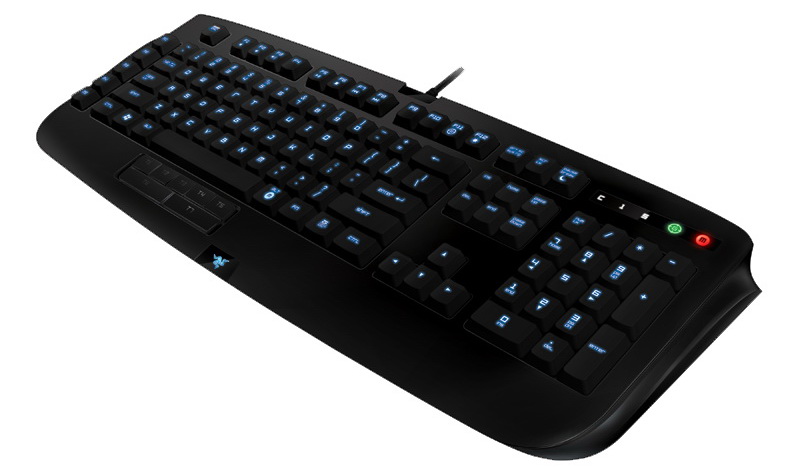
The Anansi is an attractive keyboard; it has a sleek look to it with shiny fins protruding from the sides, and back-lit keys which shift between different colours. A backlit Razer logo also features at the very bottom of the palm rest.
It feels sturdy and solid, with a braided material protecting the cable. Razer has also chosen an interesting font for the key markings, with hard edges and a robotic look.

Features
The Anansi has gone all-out on the macro key feature, with five macro keys along the left side, as well as seven flatter, softer keys for your thumb, sitting below the space bar. These softer keys will more commonly be used for key combinations such as “Control + Alt”, but it really is up to you.
Noticeably absent are any kind of additional ports, such as USB or audio inputs – keyboards of this nature generally cater to gamers’ various accessories by being more versatile than generic offerings. This is particularly frustrating as this keyboard takes up two USB slots – one which is used solely to power the backlights.
Software
Razer’s configuration utility allows you to customise any key on the board – even the letter keys. Most hardcore users will primarily be looking to customise these two sets of additional keys, which you can do intuitively and easily. You can use this not only for games, but also for navigating Windows, for example mapping a key to “Ctrl + Alt + Delete”.
The tool also lets you fiddle with the backlights and store different profiles for different games.
Typing
The keys themselves are the basic membrane switches you’d find on a regular keyboard, as opposed to the mechanical switches you often see on higher-end keyboards. Having mechanical switches is more of a personal preference, but for the money, you may be disappointed to be getting just the most basic of switches.
One thing I did notice was that the keys themselves seemed noticeably narrower, likely due to the extra space taken up by the macro keys along the side. This did make it a little awkward to type on compared to other boards. The keys are also very “deep”, as they have to be depressed quite low to register. The deep, narrow keys with the membrane switches gave the board a squidgy feel, which I found was rather awkward and required more effort to type on, but again, there are allowances to be made here for personal preference.
The depth of the keys was quite annoying in RTS and MOBA style games as well, where you want to be quickly hitting a lot of shortcut keys.
Conclusion
Overall, it’s tough to recommend the Anansi over other high-end keyboards. I’d really like to be getting a little more than a backlight and some macro keys, which, to be honest, is all this keyboard has over a cheap, generic option.
At an RRP of R999, you should be demanding more for your money, and unless you can make good use of all 12 additional keys, there are other options out there for macro fanatics.
Pros
- Sleek, attractive look with backlit keys
- More macro keys than you’d ever need
Cons
- Narrow keys with membrane switches
- Awkward to type on
- Lacking in features for the price


Related articles
Logitech K310 washable keyboard SA pricing
CM Storm Sonuz gaming headphones review
SteelSeries gaming peripherals hit SA retail






 Loading ...
