



Sometimes looks can be deceiving, with this being especially true in the world of gaming hardware, where neon lights, custom paint jobs and enough buttons to confuse NASA mission control are the flavor of the week, every week.
You’d be forgiven for thinking the Steelseries 6G V2 keyboard is nothing but an ordinary office keyboard – it looks plain, basic, and unremarkable. However, Steelseries have pumped quite a bit of technology into the 6G V2, and after all, it’s what inside that counts.
Features
The standout feature of the G6 V2 is undoubtedly Cherry MX Black mechanical keys. Cherry MX mechanical keys are starting to dominate gaming keyboards and for good reason. The MX Black keys found in the G6 V2 last for as long as 50 million key-presses and offer improved tactile feedback when compared to rubber dome triggers found on other keyboards. Furthermore they will offer this feedback for the duration of their lifespan. These switches also allow for a shorter travel distance after key presses, allowing the computer to register the keyboard input up to 50 percent quicker than a regular keyboard.
The G6 V2 keyboard also sports an anti-ghosting system that allows users to press down on all of the keyboards’ available keys at the same time, with each press registering. The Windows key is also missing, being replaced by a SteelSeries key which acts as a function-key for the media controls found on the F1 to F6 keys.
The G6 V2 is also heavy, capable of taking hits thanks to a metal plate which all keys are mounted directly onto. The plastic used on the G6 V2 also has metal infused into it, increasing weight and durability.
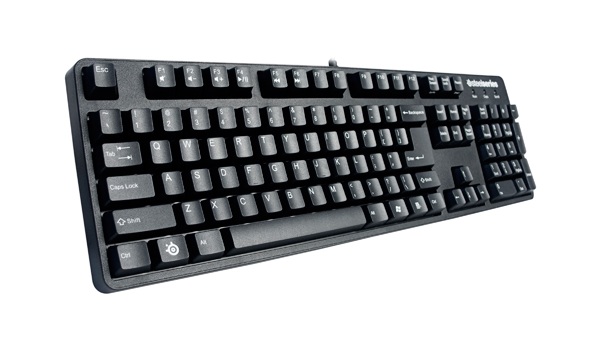
SteelSeries 6G V2 front
In use
Steelseries admits on their site that gamers and typists have to get used to working with mechanical keyboards before they will feel right to work on. This is spot on, with the keyboard feeling “odd” coming from a standard keyboard with rubber dome switches. That being said, once you’re used to the keyboard it’s a pleasure to game with.
The key strokes register quicker than a regular keyboard and provide rich feedback, making your fingers aware of what they’re doing. Going back to a regular keyboard is not an option once you’ve used a board with mechanical keys, as I often found myself wondering whether I was pressing the keys properly, without the feedback provided by the Cherry MX black switches in the G6 V2.
The Anti Ghosting system worked as advertised, and we couldn’t get the keyboard to stop functioning despite holding down 40+ keys. The lack of programmable macro keys is an issue if you’re used to a keyboard with them (and you actually use them extensively), however, if you’ve never used macro keys on a keyboard before, you aren’t missing out with the G6 V2.

SteelSeries 6G V2 side
Bottom line
They keyboard may not sport in-your-face looks, however, the feature list more than makes up for this and the SteelSeries G6 V2 is well worth considering if you’re in the market for a mechanical gaming keyboard. The lack of programmable macro keys can be an issue, but for the local retail price of around R870, the board offers very good value for money. The G6 V2 comes highly recommended.
Related articles
Logitech K310 washable keyboard SA pricing
CM Storm Sonuz gaming headphones review






 Loading ...

sounds like an awesome keyboard, but for that price, at least make it a different colour or something, it looks like my standard work Dell keyboard -_-